
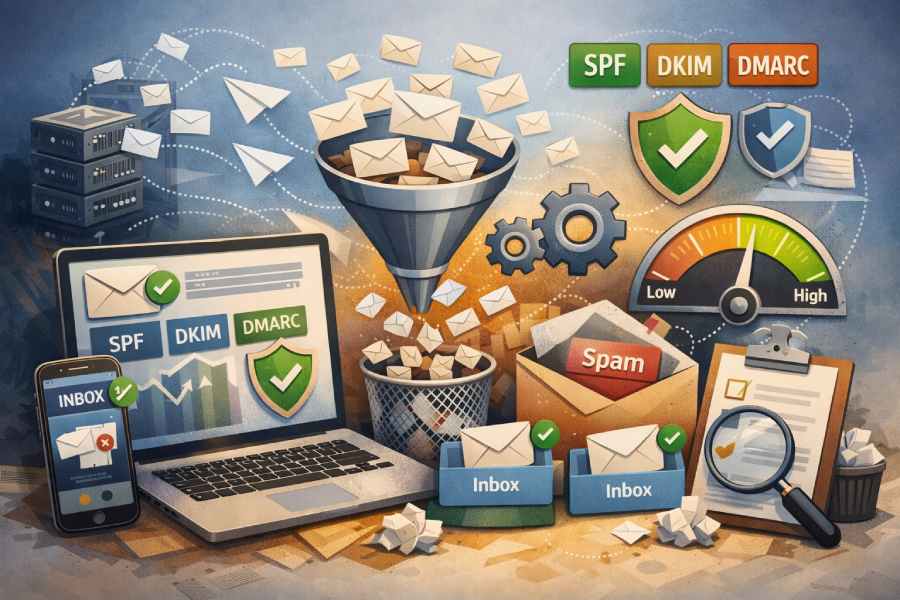
The Complete Beginner’s Guide To Email Warmup Software And Inbox Placement
Email deliverability is one of the most important factors determining whether your emails actually reach your audience or end up lost in spam folders. For beginners launching cold email campaigns, sales outreach, or marketing communications, understanding email warmup and inbox placement is essential to building trust with mailbox providers and maintaining a strong sender reputation.
The Complete Beginner’s Guide to Email Warmup Software and Inbox Placement introduces the fundamentals of how email warmup works, why it is critical for new or inactive mailboxes, and how specialized tools help automate the process.
The guide also explains the role of authentication, engagement signals, and technical configuration in improving inbox placement. By learning these concepts and applying the recommended strategies, businesses and marketers can protect their domain reputation, improve email deliverability, and increase the effectiveness of their outreach and lead generation efforts.
What Email Warmup and Inbox Placement Mean (and Why Beginners Should Care)
Plain-English definitions
- Email warmup is the intentional, gradual ramp-up of sending activity from a new or dormant mailbox to build trust with mailbox providers and improve inbox placement. The warm-up process signals to algorithms that your messages are safe, engaged-with, and aligned to recipient expectations.
- Inbox placement is where your message lands: the primary inbox, promotions, updates, or the spam folder. Consistent inbox placement is the core outcome of good email warmup and overall email deliverability.
Why it matters for beginners
For cold emailing, lead generation, and systematic email outreach, strong email deliverability determines whether your campaigns get seen or silently filtered. Email warmup software and email warmup tools accelerate trust-building by orchestrating positive interactions that reduce the odds of the spam folder and improve inbox placement. Beginners benefit because:
- The warm-up process lowers risk when launching new outreach campaigns or a new brand domain.
- A deliverability test plus a light deliverability audit highlight issues before they scale.
- The best email warmup tools add safeguards and automated warmup flows that preserve reputation while you focus on messaging, follow-up emails, and sales engagement.
How Mailbox Providers Decide Placement: Reputation, Engagement, and Risk Signals
Reputation signals that drive filtering
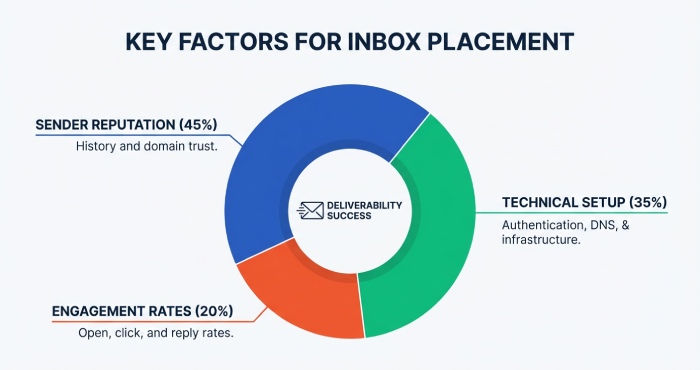
Mailbox providers like Google and Microsoft evaluate domain reputation, email reputation, and sender reputation at a granular level. Your technical setup (authentication), list quality, and historical behavior create a reputation fingerprint that predicts whether you’ll hit inbox or the spam folder.
Authentication and infrastructure
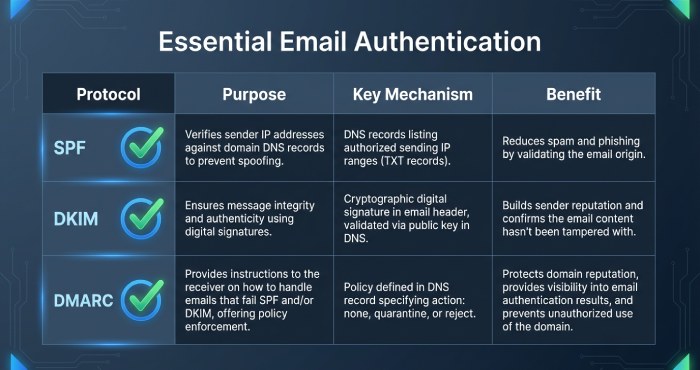
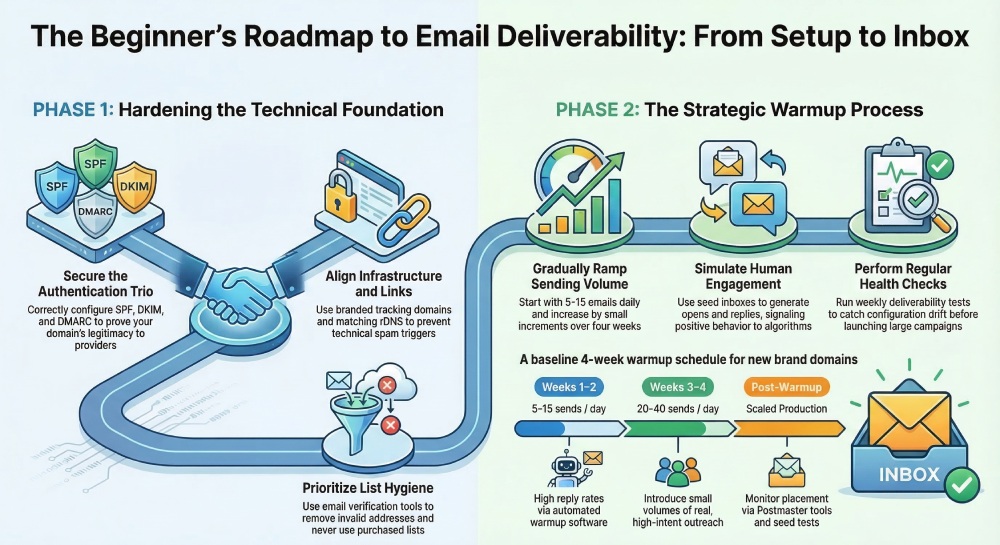
- SPF DKIM record and DMARC alignment confirm the legitimacy of your sending domain.
- rDNS (reverse DNS) validates your IP-to-domain linkage.
- Tracking domains should be branded and consistent; broken or mismatched links can harm email deliverability. A concise deliverability audit or broader audit often starts here because authentication is a prerequisite for Gmail warmup, Office 365 warmup, and reliable inbox deliverability across any email provider.
Engagement and content cues
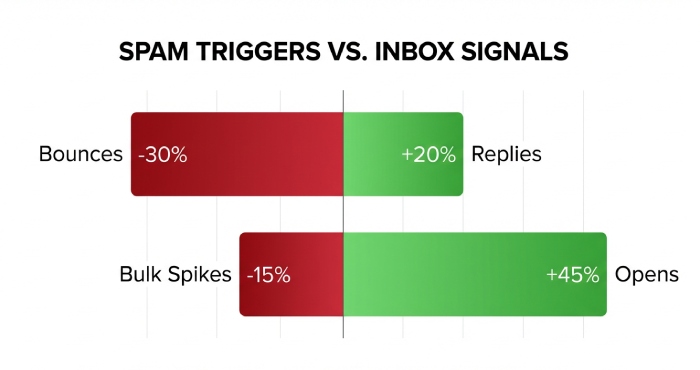
Providers weigh opens, replies, deletions without reading, and “not spam” actions. Positive engagement improves inbox placement; low engagement correlates with filtering. Warm, personalized content that nudges micro-engagement (e.g., short replies) is critical for cold emailing and B2B outreach.
Risk indicators you must avoid
- Sudden bulk email cold-email-job-1820
- Purchased or unvetted lists (don’t buy email list)
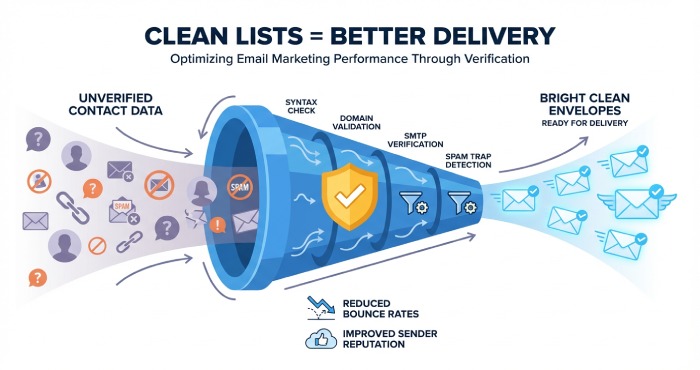
- High bounce rates from skipping email list verification or email address verification
- Spammy content, excessive links, or misleading headers When risk rises, so does the chance of the spam folder. Email testing and the email warm-up process help you find the line before you cross it.
How Email Warmup Software Works: Seed Inboxes, Positive Interactions, and Safeguards
The role of seed inboxes and human-like interactions
Email warmup software connects your mailbox to a network of seed inboxes that simulate natural behavior:
- They receive messages, open them, and sometimes reply.
- If a message lands in the spam folder, they move it into the inbox.
- Over time, this creates a pattern of positive signals that boost email deliverability and inbox placement. These are foundational warmup features that shorten the time-to-trust for new senders and help stabilize cold emailing and email outreach.
Automated warmup schedules and ramp rules
Automated warmup gradually increases daily send volume, reply ratios, and thread depth while respecting caps by each email provider. The warm-up process (and specifically the email warm-up process with hyphenation you’ll see in docs) should stay below your reputation threshold to avoid trips to the spam folder. The best email warmup tools provide adaptive throttling and health checks.
Safeguards, diagnostics, and health monitoring
Modern email warmup tools include:
- Deliverability test options that sample inbox placement across providers
- Ongoing email testing and email health scoring
- A lightweight deliverability audit to catch technical setup errors These warmup features protect sender reputation and guide optimization for lead generation and outreach campaigns.
Integrations and workflow alignment
- Cold email software integrations streamline sequencing, multichannel outreach, and follow-up emails.
- Marketing team and sales development users benefit from unified dashboards that tie warmup data to campaign outcomes, increasing email productivity.
Example platforms and what to look for
Popular platforms include Saleshandy, TrulyInbox, Lemwarm, Warmy.io, Mailivery, MailReach, Warmup Inbox, Folderly, Allegrow, Mailwarm, InboxAlly, Warmbox, Auto Warmer by QuickMail, and MailToaster. When vetting the best email warmup tools or doing a comparison:
- Seek top-rated warmup options with clear pricing, a free trial, or sign up free (note whether credit card required).
- Look for SOC 2 certified vendors if compliance matters.
- Review customer stories and case studies for similar B2B campaigns, agency solutions, startups, or small businesses.
- Evaluate demo availability, affordable warmup tools tiers, and integrations with your stack. Industry voices (for example, commentary from Piyush Patel) and resources like Lead Generation Hub or Email Deliverability Hub can help you navigate nuances.
Laying the Technical Foundation: SPF, DKIM, DMARC, BIMI, rDNS, and Tracking Domains
SPF, DKIM, and DMARC: non-negotiables
- SPF confirms which servers can send on your behalf.
- DKIM cryptographically signs messages to prove they weren’t altered.
- DMARC enforces policy and provides feedback reports. Configure each SPF DKIM record correctly, align subdomains, and monitor DMARC reports to spot drift that damages email deliverability and inbox placement.
BIMI and brand signals
BIMI displays your logo in supporting inboxes once DMARC is enforced, reinforcing trust. While not a direct ranking boost, it strengthens brand recognition for email marketing and cold emailing.
rDNS, tracking domains, and link management
Set rDNS to match your hostname. Use a branded tracking domain to avoid shared, abused shorteners. Keep links consistent and minimal to avoid content-based spam folder triggers. Pair this with ongoing deliverability test routines and email address verification to prevent soft and hard bounces that erode sender reputation.
Provider-specific notes: Gmail warmup and Office 365 warmup
Google and Microsoft ecosystems each apply unique heuristics. Gmail warmup benefits from slow, steady ramping and authentic replies; Office 365 warmup often requires stricter throttles and attention to organizational policies. Calibrate automated warmup behavior per email provider to protect domain reputation and email reputation.
Crafting a Warmup Plan: Schedules for New Domains, New IPs, and New Mailboxes
New domains: start slow, prove consistency
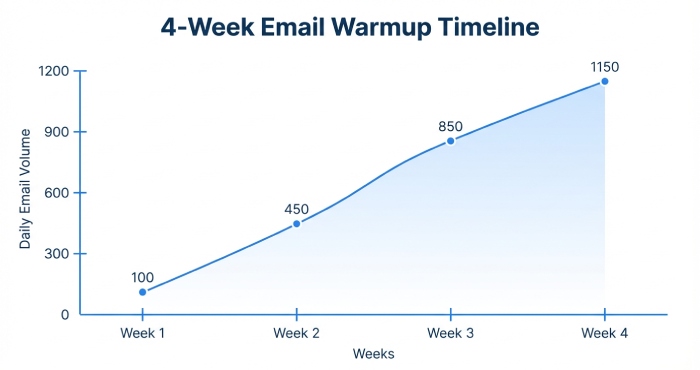
- Week 1–2: 5–15 sends/day via email warmup software with high reply rates from seed inboxes. Run a deliverability test twice weekly and a quick deliverability audit to validate SPF/DKIM/DMARC. Keep cold emailing minimal while the warm-up process builds trust for inbox placement.
- Week 3–4: Increase to 20–40/day, mix in a small volume of real email outreach to highly engaged contacts. Continue automated warmup alongside outreach campaigns to prevent dips into the spam folder. This is where the best email warmup tools and warmup features like adaptive throttling shine.
New IPs: stabilize the baseline
If you control a dedicated IP for bulk email, ramp in smaller increments and maintain unwavering list hygiene. Combine email testing with DMARC monitoring and rDNS checks. Pair automated warmup with gradual campaign scaling to protect sender reputation and inbox deliverability.
New mailboxes: diversify and stagger
For B2B outreach, split volume across multiple mailboxes, each on its own warm-up process. This improves resilience and throughput for lead generation without tripping filters. Coordinate with your marketing team to align sequences, content, and timing.
Volume, cadence, and message design
- Cap daily new sends initially; increase by 5–10 per day as metrics allow.
- Keep messages short, plain-text leaning, and invite replies.
- Moderate follow-up emails; early-stage over-aggression leads to the spam folder.
Data quality, compliance, and hygiene
- Build a targeted lead list; use email list verification to reduce bounces.
- Never buy email list data; it harms domain reputation and can poison future inbox placement.
- Maintain opt-out mechanisms and respect local regulations even in cold emailing contexts.
Measurement, iteration, and playbooks
- Track open rates, reply rates, spam complaints, and placement via recurring deliverability test panels.
- Use a monthly deliverability audit to catch technical regressions and to guide optimization.
- Study customer stories and case studies to benchmark realistic outcomes; adapt for your vertical.
- For agencies and complex B2B campaigns, package playbooks as agency solutions with clear service level agreement (SLA) and checkpoints.
Operational tips for teams
- Document the email warm-up process in your SOPs; align sales development, sales engagement, and email marketing calendars.
- Reserve a period for Gmail warmup or Office 365 warmup before major launches.
- Leverage platforms that offer affordable warmup tools, top-rated warmup automation, and seamless integrations.
- As you scale, revisit pricing, comparison notes, and whether you need a demo or a SOC 2 certified vendor to satisfy stakeholders.
By treating email warmup, email warmup tools, and email warmup software as foundational infrastructure—and by continuously validating with deliverability test panels and a recurring deliverability audit—you’ll protect email deliverability, strengthen inbox placement, and keep your hard-won messages out of the spam folder while accelerating lead generation and ROI from email outreach.
Selecting a Warmup Tool: Must-Have Features, Integrations, Pricing, and Safety Checks
Core warmup features to prioritize
Automated warmup that mimics real conversations
Look for email warmup software that performs automated warmup with realistic opens, replies, and thread depth. High-quality email warmup tools simulate gradual volume ramps and positive engagement to build domain reputation and sender reputation without triggering the spam folder. The best email warmup tools provide granular control of the warm-up process and the email warm-up process across inboxes and domains.
Deliverability test and inbox placement monitoring
A built-in deliverability test (seed and panel-based) should show inbox placement vs. spam folder outcomes by mailbox provider. Top-rated warmup platforms surface placement by Gmail, Outlook, Yahoo, and custom domains, helping you adjust cold emailing volume before major outreach campaigns. Repeat the deliverability test during and after the warm-up process to catch regressions early.
Deliverability audit and technical setup checks
Strong warmup features include a deliverability audit that validates SPF DKIM record and DMARC alignment, reverse DNS, and tracking domains. The audit should flag configuration drift and recommend technical setup fixes before scaling B2B outreach or bulk email. Easy-to-follow guidance keeps email health stable and protects email reputation.
Network quality, security, and safety controls
Choose vendors with vetted networks that reduce risk of spam traps and protect inbox deliverability. SOC 2 certified providers, clear data handling policies, and abuse-prevention logic are musts. Safety checks like throttling, reputation floors, and automatic pauses prevent over-aggressive automated warmup that could harm inbox placement.
Integrations for your workflow
Ensure Gmail warmup and Office 365 warmup are first-class integrations, plus native connections to cold email software, sales engagement tools, and CRMs. OAuth-based authentication with each email provider is safer than passwords. API access, webhooks, and Zapier support help your marketing team align multichannel outreach.
Reporting, tests, and transparency
You want clear dashboards to track the warm-up process, pass/fail on each deliverability test, and audit trails. Daily and weekly summaries support a continuous deliverability audit alongside routine email testing, so sales development and B2B campaigns stay within safe limits.
Pricing, trials, and procurement
Affordable warmup tools and trial experience
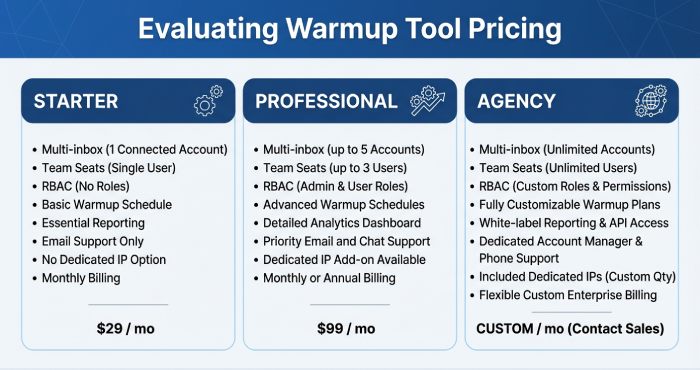
Assess pricing tiers, seat-based vs. inbox-based plans, and allowances for multiple domains. Favor affordable warmup tools that offer a free trial or sign up free option to run a quick comparison across platforms; note when a credit card required gate exists. The best email warmup tools make cancellation easy, surface usage caps, and are transparent about overage pricing.
Licensing for teams and agencies
If you support agency solutions or a larger marketing team, verify multi-inbox management, Role-based access control (RBAC), and consolidated billing. Look for customer stories and case studies showing results for startups and small businesses as well as enterprise rollouts. Team features should streamline email productivity and prevent configuration sprawl.
Vendor landscape and quick picks
Recognized platforms in the warmup category
Well-known names include Saleshandy (TrulyInbox), Lemwarm, Warmy.io, Mailivery, MailReach, Warmup Inbox, Folderly, Allegrow, Mailwarm, InboxAlly, Warmbox, Auto Warmer by QuickMail, and MailToaster. Evaluate each against warmup features, integrations, and policy compliance before shortlisting the best email warmup tools for your stack.
Learn from peers and experts
Scan customer stories, case studies, and community threads in places like Lead Generation Hub and Email Deliverability Hub. Thought leaders such as Piyush Patel often share nuanced deliverability insights that help you vet email warmup software beyond glossy demos.
Compliance and data protection
Confirm data residency options, SOC 2 certified status, and alignment with Google and Microsoft policies. Ask vendors for a demo that walks through safety controls, their deliverability audit methodology, and how they avoid filling your spam folder during automated warmup.
Measuring Deliverability: Seed Tests, Panel Data, Postmaster Tools, and Key KPIs
Measurement methods you can trust
Seed lists for controlled deliverability tests
Seed-based deliverability test workflows send messages to known inboxes across providers to assess inbox placement. Run seeds pre-warm, mid-warm, and post-warm to quantify gains from email warmup tools and detect sudden spam folder drift tied to content or volume.
Panel and telemetry-based signals
Panel data complements seeds by aggregating anonymized real-user placement and engagement trends. Pair these signals with your email testing regimen to validate the warm-up process on live traffic without risking large-scale cold emailing.
Postmaster and provider diagnostics
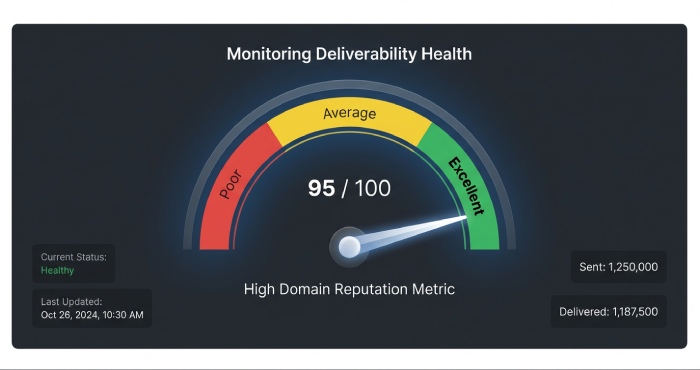
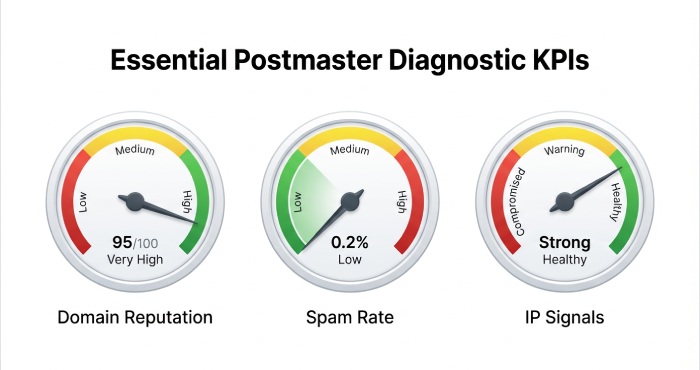
Use Google Postmaster Tools and Microsoft SNDS to track domain reputation, spam rate, and IP signals. These postmaster tools are essential to any deliverability audit and help connect inbox placement changes to infrastructure and behavior.
KPIs for ongoing governance
Placement and complaint rates
Monitor inbox placement rate, spam folder rate, spam complaints, and block events. Tie shifts back to specific outreach campaigns, content changes, or spikes in follow-up emails.
Reputation and bounce health
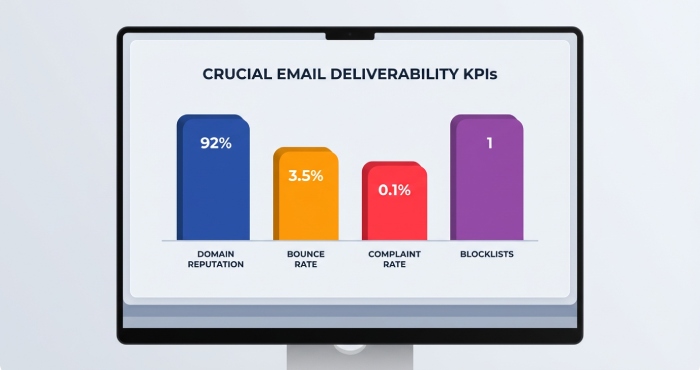
Track domain reputation, sender reputation, and overall email reputation. Watch hard bounces, unknown users, and blocklist hits as leading indicators of list quality and email health.
Frequency, velocity, and engagement
Review send frequency, velocity ramps, opens, replies, and deletions. Stabilize these KPIs during the email warm-up process before scaling lead generation volume.
Operationalizing measurement
Cadence and dashboards
Set weekly reviews for teams running B2B outreach to catch trends early. Consolidate deliverability test results and postmaster data in shared dashboards so sales engagement and marketing stakeholders can quickly identify issues and optimize performance.
Using Nureply to monitor sending patterns, engagement signals, and inbox placement can further strengthen this process, helping teams act faster and maintain healthy email deliverability.
Reading the signals post-warm
Natural fluctuations happen. If inbox placement dips after automated warmup ends, reintroduce a lighter warm-up process and adjust cold emailing volume while you investigate content or list issues.
Content and Sending Best Practices to Support Warmup and Maintain Reputation
List hygiene and targeting
Verification before you send
Apply email list verification and email address verification to every lead list. Never buy email list data; instead, source opt-in or high-intent contacts to protect inbox deliverability and email reputation.
Copy and structure that avoids spam triggers
Keep it human and helpful
Use plain-text or light HTML, minimize links and images, and avoid trigger words that push mail to the spam folder. Make messages relevant to the recipient and tailor follow-up emails with fresh value.

Sending patterns that scale safely
Ramping and channel mix
Ramp gradually from automated warmup into production. Respect bulk email limits and align multichannel outreach (social, phone) to reduce pressure on cold emailing while maintaining lead generation momentum.
Technical setup you cannot ignore
Authentication and consistency
Lock in SPF DKIM record alignment, DMARC policy, and stable tracking domains. Consistent from names, reply-to, and working unsubscribes are table stakes for any email marketing motion.
Troubleshooting Poor Placement: Spam Triggers, Blocks, Blacklists, and Recovery Steps
Diagnose the real issue
Run a fast deliverability audit
Start with a fresh deliverability audit and targeted email testing to pinpoint whether content, infrastructure, or list quality caused the spam folder surge. Inspect headers, MTAs, and bounce codes for clues.
Check blocklists and filters
Scan popular blocklists and review internal filters at your email provider. Review complaint data; spikes often correlate with aggressive follow-up emails or irrelevant email outreach.
Remediate with a structured plan
Slow down and rebuild
Pause aggressive outreach campaigns, reduce volume, and sunset questionable segments to restore email health. Reintroduce automated warmup with email warmup software tuned for your Gmail warmup or Office 365 warmup setup.
Fix content and permissions
Refresh templates, reduce links, and reconfirm consent where needed. Use a deliverability test after each change to confirm better inbox placement before scaling.
Escalate when necessary
Work with providers and delisting teams
Engage Google and Microsoft support when platform-specific blocks persist. Follow delist procedures meticulously and document steps for your internal audit.
Compliance, Risk, and Ethics: Provider Policies, Legal Considerations, and Realistic Limits
Respect provider and legal frameworks
Align with mailbox provider requirements
Comply with Google and Microsoft bulk-sender requirements, including authentication and easy one-click unsubscribe. Keep your technical setup tight and consistent with policy updates.
Understand cold emailing laws
Map your cold emailing and email marketing practices to CAN-SPAM, GDPR, and regional rules. Maintain consent records and suppression lists to protect sender reputation and mitigate risk.
Build ethical, value-first outreach
Quality over quantity
Don’t scrape or mislead. Ethical email outreach with clear value propositions sustains inbox placement and fuels long-term lead generation.
Operate within realistic limits
Govern volume and growth
Set volume ceilings per domain and mailbox, warming multiple sending identities over time. This is especially important for startups and small businesses that scale B2B campaigns quickly.
Document and review regularly
Maintain playbooks, conduct quarterly audits, and log changes to the warm-up process and outreach cadence for transparency.
Operational red flags checklist
- Rapid volume spikes after automated warmup
- Rising spam folder rate or complaints
- Failing deliverability test across multiple providers
- Missing SPF DKIM record alignment
- Inconsistent unsubscribe or sender identity
FAQs
What warmup features matter most when selecting a tool?
Prioritize automated warmup that simulates realistic replies, a robust deliverability test suite, and a comprehensive deliverability audit for authentication and configuration. Ensure strong reporting, safety throttles, and integrations with your email provider and cold email software.
How often should I run deliverability tests during the warm-up process?
Run a deliverability test before starting, weekly during the warm-up process, and after scaling to production. Continue periodic testing to track inbox placement and catch early signs of spam folder drift.
Can email warmup tools fix bad lists or poor content?
No. Email warmup software amplifies good practices but cannot overcome low-quality lists or deceptive content. Focus on email list verification, relevant messaging, and permission to improve email deliverability.
Which vendors are commonly used for warmup?
Teams often evaluate Saleshandy (TrulyInbox), Lemwarm, Warmy.io, Mailivery, MailReach, Warmup Inbox, Folderly, Allegrow, Mailwarm, InboxAlly, Warmbox, Auto Warmer by QuickMail, and MailToaster. Compare warmup features, pricing, security, and customer stories to identify the best email warmup tools for your needs.
What KPIs should I track beyond inbox placement?
Monitor domain reputation, sender reputation, complaint rate, bounce rate, and blocklist status. Pair these with engagement and volume metrics to maintain email health as you scale cold emailing.
Is there a truly free email warmup option worth using?
Some vendors offer free email warmup tiers or a free trial. Validate limits, whether a credit card required barrier exists, and ensure the platform’s safety controls meet your standards before adoption.
How can I recover from a sudden spam folder spike?
Pause sends, run a deliverability audit, fix content and authentication, then reintroduce automated warmup at low volume. Use seed-based deliverability tests to confirm recovery before resuming outreach campaigns.
Key Takeaways
- Choose email warmup software with automated warmup, deliverability test capabilities, and a thorough deliverability audit to safeguard inbox placement.
- Measure email deliverability continuously with seeds, panel data, and postmaster tools; track domain reputation, complaints, and spam folder rates.
- Support warmup with list hygiene, authentic content, gradual volume, and airtight SPF DKIM record alignment and DMARC.
- Troubleshoot dips methodically: reduce volume, fix content, re-warm, and escalate to providers when necessary.
- Operate ethically within provider policies and laws, setting realistic sending limits to protect long-term lead generation and email outreach performance.