

How To Use A Spam Checker Tool To Pass SPF, DKIM, And DMARC Before Sending
Before you send emails at scale, a pre-send check with a spam checker tool is the most efficient way to predict how mailbox providers will treat your message. A modern email spam checker runs a comprehensive spam test thatverifies SPF, DKIM, and DMARC, analyzes email content, and looks for signals that spam filters use to detect spam. These insights help you avoid spam issues that can quietly erode email deliverability and email sender reputation over time.
Authentication is foundational. Even great email templates and highly personalized email copy can be filtered if your domain identity is not aligned. Running a spam test with an email checker before you send emails lets you confirm technical setup and surface spam words, spam trigger words, and other spammy words that might push your message toward the spam folder. This is critical whether you’re using a mail merge for bulk emails, orchestrating mass emails for an email campaign, or sending one well-timed test email.
Finally, a good spam checker provides actionable feedback: an email score, detailed spam test results, and practical fixes. Use it as part of your email verification and email deliverability test workflow—especially when iterating on email templates, experimenting with follow-ups, and updating tracking or automation settings.
SPF, DKIM, and DMARC in plain English: how each works and alignment basics
SPF in simple terms
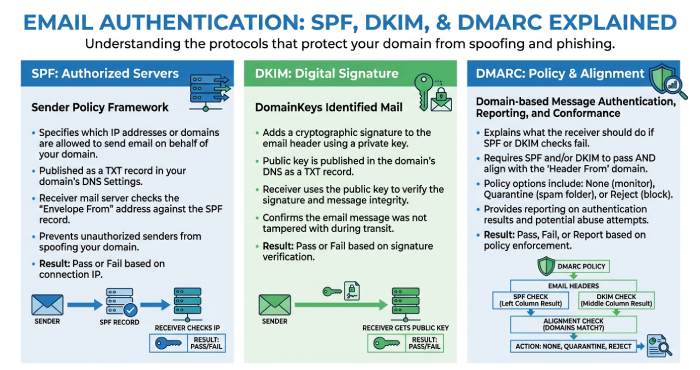
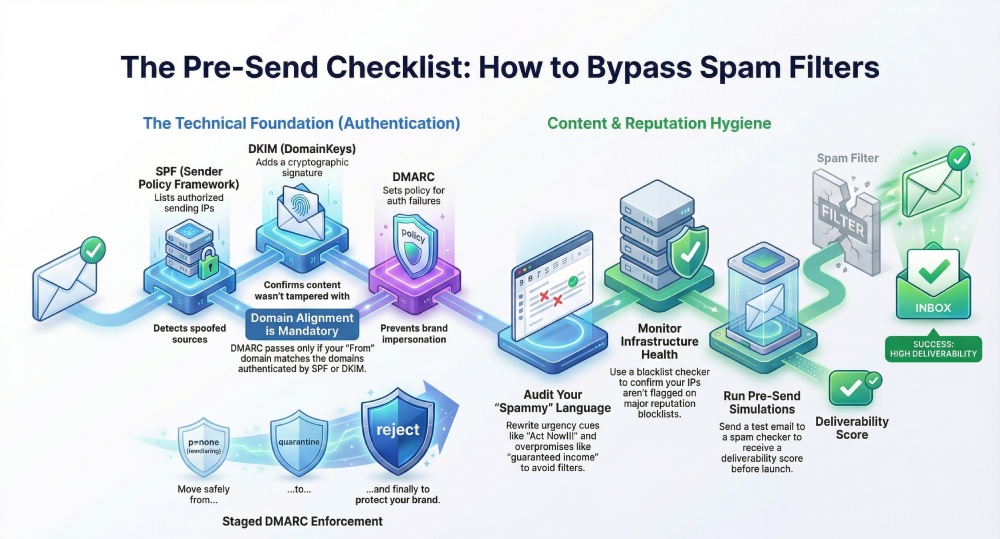
Sender Policy Framework (SPF) is a DNS record for your domain that lists which servers are allowed to send on your behalf. When you send an email, receiving servers run an SPF check by comparing the sending IP or host to your domain’s SPF record. If it matches, SPF passes; if not, you risk failing authentication and hitting a spam filter. Proper SPF helps detect spam from spoofed sources and supports higher email deliverability.
DKIM in simple terms
DomainKeys Identified Mail (DKIM) adds a cryptographic signature to your messages. Receivers run a DKIM check using your public key published in DNS to confirm the message wasn’t tampered with and that it really came from your domain. Passing DKIM signals trust, stabilizes email reputation, and helps avoid spam filters even when content contains mild spam words or marketing terms.
DMARC in simple terms
DMARC tells receivers what to do when SPF or DKIM fail, and ensures the visible From: domain aligns with authenticated domains. A DMARC check enforces policies (none, quarantine, reject), guiding how to treat suspicious messages. With DMARC alignment in place, it’s far harder for attackers to impersonate your brand, and you get reports to monitor email sender reputation.
Alignment basics you should know
- Domain alignment means that the domain in your From: header matches (or is a subdomain of) the domain authenticated by SPF and/or DKIM.
- DMARC passes if either aligned SPF or aligned DKIM passes.
- For consistent inbox placement, ensure your mail merge tool, CRM, or ESP uses a From: domain you control and authenticate.
What a spam checker tool examines: authentication headers, DNS, content, and blocklists
Authentication and DNS signals
A robust spam checker verifies:
- SPF check: Valid record, lookup counts, include chains, and alignment.
- DKIM check: Key presence, signature validity, selector health, and canonicalization.
- DMARC check: Policy strength, alignment mode (relaxed/strict), and reporting. It also inspects DNS health (MX, A, TXT) to detect misconfigurations that often harm email deliverability.
Content and language signals
An email spam checker evaluates email content to detect spam indicators:
- Flags spam words, spam trigger words, and spammy words that correlate with complaints or low engagement.
- Highlights filter words, unnatural words, and patterns of urgency, overpromise, or shady words.
- Calls out money words and risky formatting in email templates that may look promotional-heavy. Pair this with an AI email assistant or AI email writer to rewrite lines and keep clean email copy. Tools may simulate anti-spam filter heuristics and assign an email score so you can prioritize fixes.
Words to rewrite right now
- Urgency cues without context (e.g., “Act now!!!”)
- Overpromise or shady words (e.g., “guaranteed income”)
- Money words concentrated in subject lines (e.g., “earn $$$ today”)
Infrastructure and blocklists
A spam checker tool typically includes a blacklist checker to see if your IPs or sending domains are on major blocklists. It may surface spam detection events from reputation sources and advise on warming, throttling, or segmentation. Expect transparent privacy notes about what is analyzed and stored.
Provider-specific simulations
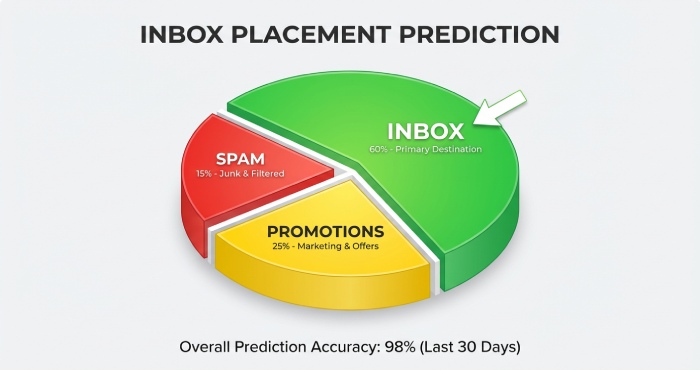
Some tools model how Gmail and other providers weigh factors. They can test inbox placement, detect spam thresholds, and estimate whether your message might land in the spam folder or promotions. Combined with a targeted email deliverability test, you’ll know when to adjust tracking, authentication, or content.
Picking a spam checker: must-have features, integrations, and sample tools
Must-have features
- Comprehensive SPF/DKIM/DMARC verification and alignment analysis
- Content linting for spam words, spam trigger words, and spammy words
- Blocklist checker and infrastructure diagnostics
- Actionable spam test results and a clear email score
- Email verification aids to verify email domains and configuration pre-send
- Privacy-first data handling, with exportable reports and feedback loops
Integrations for mail merge and marketing stacks
Look for a spam checker tool that plugs into your workflow:
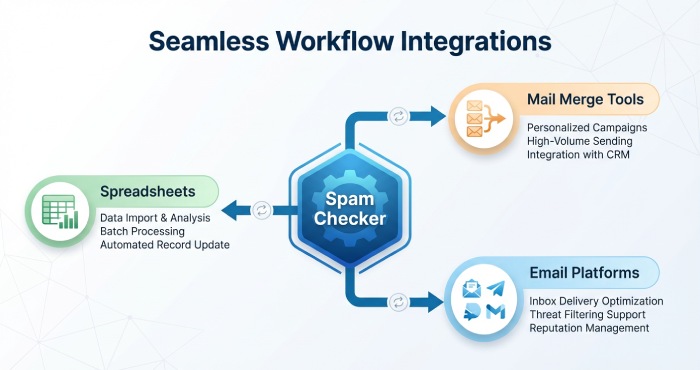
- Gmail mail merge, Google Sheets mail merge, and Google Docs mail merge for fast personalization at scale
- Compatibility with Mailmeteor, GMass, Yesware, Lemlist, Mailchimp, and MailerLite
- Supportive utilities like Email Checker, Email Finder, Reverse Email Lookup, and Email Extractor for compliant prospecting
- Smooth use alongside Gmail, Google Sheets, Microsoft Excel, and popular email marketing automation platforms
These integrations help ensure your email templates remain optimized as you send bulk emails or mass emails while keeping authentication consistent across systems.
Sample tools trusted by professionals
- mail-tester.com (also known as mail-tester) is widely used for a quick spam test and content review.
- Mailmeteor is a popular option for mail merge in Gmail and offers a workflow where you can run a pre-send check, personalize email content, and avoid spam issues across campaigns.
A good free spam checker can be enough for a first pass; as volume grows, choose a spam checker with deeper diagnostics and team features.
Preparing your domain: creating a correct SPF record and avoiding common pitfalls
Map your senders and data flows
Inventory every system that can send emails for your domain: your primary mailbox (e.g., Gmail), mail merge tools, marketing platforms (Mailchimp, MailerLite), sales outreach tools (Lemlist, GMass, Yesware), ticketing, and transactional services. Document From: domains, envelope senders, and IPs in Google Sheets or Microsoft Excel, then run an email verification of DNS for each to verify email authentication capabilities.
Build a valid SPF record
Start with one SPF record per domain:
- Use v=spf1, then list mechanisms (ip4, ip6, include) for each approved sender.
- End with ~all (softfail) while testing; move to -all (fail) when confident.
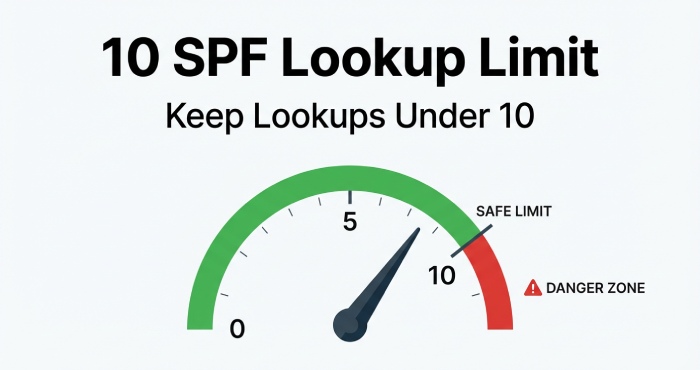
- Keep total DNS lookups under 10 by consolidating providers and using includes wisely.
Example pattern (adapt to your stack):
v=spf1 include:_spf.google.com include:mailservice.example ip4:203.0.113.8 ~all
Run a spam test after changes. A capable email spam checker will confirm your SPF check passes and that alignment with your From: domain is correct. Combine this with DKIM check and DMARC check to ensure end-to-end authentication.
Common pitfalls to avoid
- Multiple SPF records: Only one SPF TXT record per domain. Multiple records break evaluation and can trigger a spam filter response.
- Exceeding lookup limits: Too many include mechanisms can exceed the 10-lookup cap. Flatten when necessary or consolidate vendors to avoid spam filters that detect misconfigurations.
- Misaligned domains: If your mail merge or ESP uses a different domain for the envelope sender, DMARC may fail. Align your From: domain or configure custom domains within the platform.
Run a final spam test and content pass
- Send a test email to your spam checker tool and review spam test results for authentication, content, and blocklists.
- Use the blacklist checker to ensure no IPs or domains are listed; remediate if found.
- Audit email content and rewrite any spam words, spam trigger words, or spammy words. Keep language natural and avoid unnecessary urgency, overpromise, shady words, money words, and other filter words that detect spam.
- Validate that your email templates render properly, links are clean, tracking parameters aren’t excessive, and the message reads like a clean email written for humans. An AI Email Assistant or AI Email Writer can help refine phrasing and remove unnatural words.
Operationalize the workflow
- For campaigns and follow-ups, schedule an email deliverability test before each new sequence.
- Standardize email verification and DNS checks when adding a new tool to your stack.
- In mail merge workflows (Gmail mail merge or Mailmeteor), keep authentication aligned, personalize email responsibly, and avoid spam filters by limiting send volume and respecting privacy norms.
- Document changes to SPF, DKIM, and DMARC, and capture feedback from your team so best practices evolve with your email campaign needs.
With a disciplined pre-send process combining a reliable spam checker, careful email content review, and airtight authentication you materially improve your chances of reaching the inbox at scale.
Setting up DKIM: generating keys, publishing selectors, and testing signatures
Generate and register DKIM keys
DomainKeys Identified Mail (DKIM) lets receiving servers verify that your email content hasn’t been altered in transit and that it was sent by an authorized system. In your ESP or sending stack (e.g., Gmail, Mailchimp, MailerLite, Lemlist, GMass, Yesware, or a custom SMTP), generate a DKIM key pair and a selector. Most platforms let you create multiple selectors so you can rotate keys without downtime. Use at least 2048-bit keys to strengthen your email sender reputation and help avoid spam filters.
You’ll receive TXT records for DNS. Each record maps a selector (e.g., s1) to a public key under selector._domainkey.example.com. Keep the private key secured and restrict access to preserve privacy and integrity.
Key length, rotation, and multiple selectors
- Prefer 2048-bit keys; 1024-bit is still accepted but offers less protection.
- Publish two selectors (e.g., s1, s2) so you can rotate keys seamlessly.
- Rotate keys at least annually or if you suspect compromise.
Publish selectors in DNS
Add the provided TXT records to your DNS host (Cloudflare, Route 53, etc.). Propagation can take minutes to hours. Confirm the records are visible using dig, nslookup, or a DNS dashboard in your spam checker tool. Accurate DNS publishing is foundational for strong email deliverability and helps your spam filter verdicts lean in your favor.
Validate and test DKIM signatures
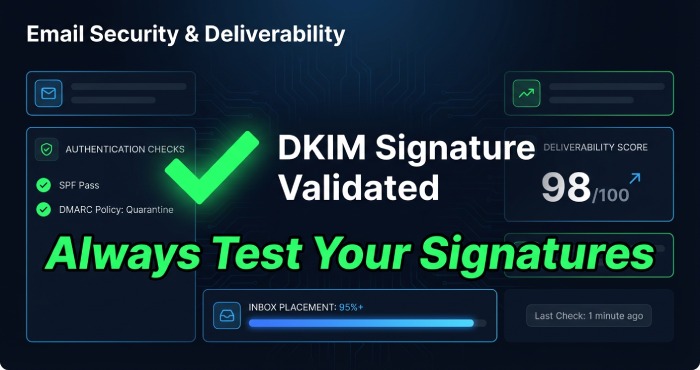
Send a test email to your own mailbox and to a trusted email spam checker. Tools like mail-tester.com and Mailmeteor’s free spam checker will display DKIM check status, selector used, and alignment results. A green DKIM check indicates the signature validates. If it fails, verify the selector label, remove stray quotes/line breaks, and ensure your sending service is actually signing with the domain you published.
Rolling out DMARC: choosing policy, enabling reporting, and staged enforcement
Choose a DMARC policy and alignment mode
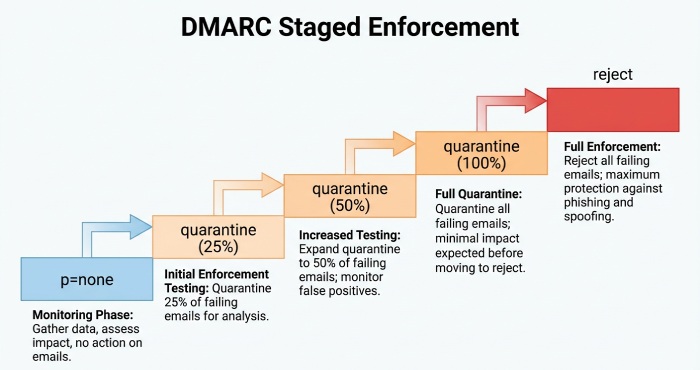
DMARC ties SPF and DKIM to your visible From domain, protecting email reputation and your users’ inbox security. Start with p=none to observe without impacting delivery, then move to quarantine and finally reject. For brands with subdomain sending, use sp= to set subdomain policy. Consider relaxed alignment for DKIM or SPF at first; move to strict alignment as your infrastructure stabilizes.
Enable aggregate and forensic reporting
Publish rua and ruf tags in your DMARC record to receive XML aggregate reports and optional forensic samples. Route reports to a dedicated address (e.g., dmarc-reports@) and parse them with a dashboard or spreadsheet (Google Sheets or Microsoft Excel) for trend analysis. These reports provide ongoing feedback about sources sending on your behalf and help detect spam and spoofing attempts quickly.
Stage enforcement safely
Increase enforcement gradually: 25% quarantine, then 50%, then 100%, and finally reject. During each phase, run an email deliverability test with a spam checker tool to spot regressions early. Staged enforcement prevents legitimate mass emails and bulk emails including those sent via Nureply from being blocked while you align all systems.
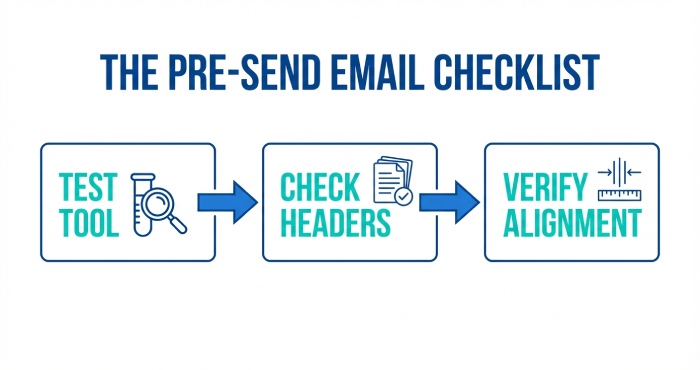
Running a pre-send test: sending to the tool, capturing headers, and verifying alignment
Send to a reputable spam checker before you send emails broadly
Before launching any email campaign or mail merge, run a spam test. Send a test email to an address provided by a reliable email spam checker such as mail-tester.com or Mailmeteor. These platforms are trusted by professionals to detect spam risks, score your setup, and highlight spammy words or spam trigger words in your email content.
Capture and read message headers
Open the delivered message in Gmail (Show original) or your client of choice and copy the headers. Look for Authentication-Results to confirm SPF, DKIM, and DMARC. A proper SPF check and DKIM check will read “pass,” and DMARC should pass with alignment. Save these headers for tracking changes over time and for quick troubleshooting.
Verify alignment and infrastructure health
Alignment means the domain in your DKIM d= or SPF Return-Path matches your From domain per DMARC rules. Use your spam checker tool’s diagnostics to confirm alignment and review your email score. If alignment fails, adjust your sending domain, update your envelope sender, or switch your selector until the spam test results improve.
Interpreting results and fixing issues: top errors and how to resolve them fast
SPF problems: too many lookups or missing senders
Common SPF errors include exceeding 10 DNS lookups, missing sending IPs, or incorrect include chains. Consolidate providers, remove unused includes, and leverage subdomain delegation if you use multiple platforms like Mailchimp, MailerLite, Lemlist, or Yesware. Re-run an email deliverability test and verify email alignment passes with a compliant SPF record.
DKIM issues: bad DNS formatting or wrong signing domain
If DKIM fails, check for line-wrapped keys, stray characters, or TXT record size limits. Confirm your sender is signing with the correct domain and selector. Rotate to a fresh selector if necessary and re-test with a spam checker to confirm the fix.
DMARC failures: misalignment and overly aggressive policy
DMARC fails when either SPF or DKIM doesn’t align with the visible From domain. Loosen alignment temporarily (relaxed mode), correct your From domain, or adjust routing so the envelope sender matches. If you move to reject too quickly, step back to quarantine while you remediate.
Content-related blocks: spam filter and language triggers
Even perfect authentication can land in the spam folder if your copy trips an anti-spam filter.
Watch your language, tone, and structure
- Avoid overpromise, shady words, and money words. Replace unnatural words and filter words with clear, specific phrasing.
- Limit urgency cues (e.g., ALL CAPS, too many exclamation points). Overuse can trigger spam detection.
- Use clean email templates; personalize with dynamic fields for personalized email without sounding robotic.
Reputation, lists, and infrastructure quality
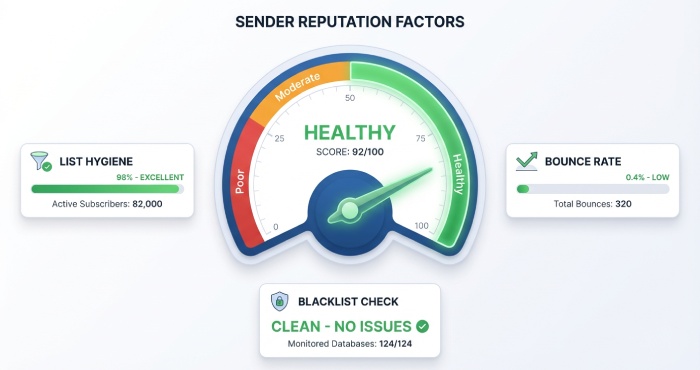
Poor email address hygiene or low engagement harms email reputation. Use an Email Checker or email verification before large sends, prune bounces, and suppress complainers. A blacklist checker can reveal listings that depress inbox placement; request delisting after fixing the root cause. Keep feedback loops enabled and respect privacy to maintain long-term sender trust.
Building a repeatable workflow: automation, monitoring, and ongoing deliverability hygiene
Automate checks and governance
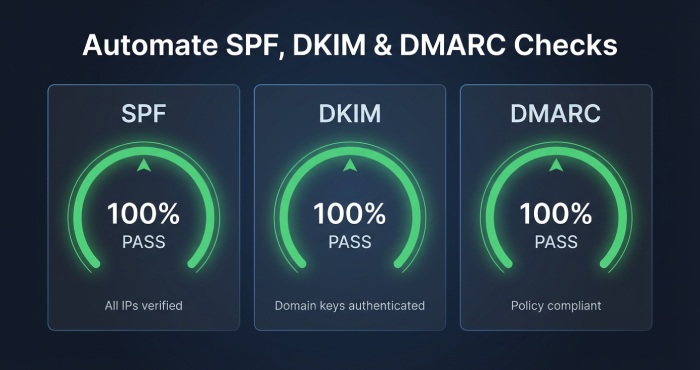
Operationalize a weekly automation that runs SPF check, DKIM check, and DMARC check across all domains. Integrate a blacklist checker and mail-tester in your CI or pre-send pipeline. With Mailmeteor, you can pair an AI Email Assistant or AI Email Writer to refine email content and a free spam checker to detect spam risks before launch.
Cadence and ownership
- Pre-send: spam test and email deliverability test on every new template.
- Weekly: DNS and blacklist sweeps, plus authentication audits.
- Monthly: Review engagement, spam folder rates, and sender reputation trends.
Maintain lists and identity accuracy
Keep a clean email database using tools like Email Finder, Reverse Email Lookup, and Email Extractor to enrich and validate, then verify email addresses before campaigns. Segment by engagement and run gentle follow-ups rather than aggressive sequences. Accurate identity and measured tracking build positive email sender reputation over time.
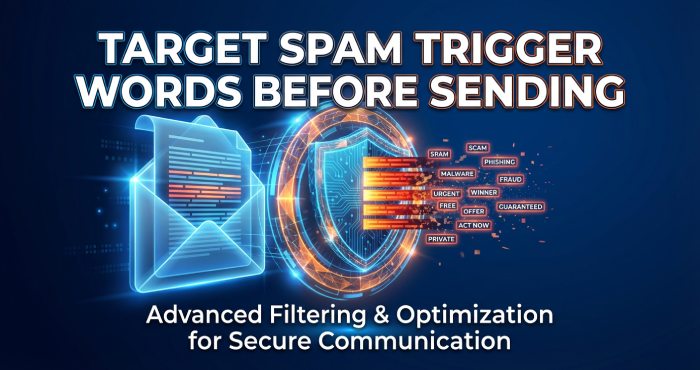
Pre-send content QA with an email spam checker
Run every draft through an email spam checker to surface spam words and spam trigger words, recommend alternative phrasing, and score risk. Many teams embed a spam checker tool inside their Google Sheets mail merge or Google Docs mail merge workflow with Mailmeteor, so copy and merge tags are scanned together. This helps avoid spam filters while preserving the benefits of personalized email merge at scale, including Gmail mail merge.
Orchestrate campaigns across tools
If you send emails via platforms like Mailchimp, MailerLite, Lemlist, GMass, or Yesware, standardize your email templates and test email steps. Keep separate selectors and subdomains per tool, document best practices, and ensure each service passes DMARC. Store playbooks in Google Docs and manage sending lists in Google Sheets or Microsoft Excel for version control.
Monitor, learn, and iterate
Track complaint rates, opens, clicks, and placement signals to spot trends. When spam detection rises, roll back copy that may include spammy words, adjust cadence, and re-run a spam test. Incorporate stakeholder feedback loops and maintain a library of clean email examples trusted by professionals to accelerate future campaigns.
FAQs
How do I know if my DKIM is set up correctly?
Send a test email to a spam checker like mail-tester.com or Mailmeteor and check for a DKIM “pass” in the spam test results. You can also view Authentication-Results headers in Gmail to confirm the selector and signing domain.
What DMARC policy should I start with?
Begin with p=none to collect reports without affecting delivery, then move to quarantine and finally reject as alignment improves. Use staged rollout (25%, 50%, 100%) to avoid accidental blocking.
Why does my email still hit the spam folder even with SPF, DKIM, and DMARC?
Content and reputation matter: spam words, aggressive urgency, or money words can trip an anti-spam filter. Also review list quality, complaint rates, and use an email spam checker to fine-tune messaging.
How often should I rotate DKIM keys and review DNS?
Rotate at least annually or after any suspected issue, and review SPF/DKIM/DMARC monthly. Automate an SPF check, DKIM check, and DMARC check to catch drift early.
What tools help maintain deliverability at scale?
Use Mailmeteor for Gmail mail merge, spam testing, and content assistance via AI Email Assistant and AI Email Writer. Complement with a blacklist checker, Email Checker for verification, and mail-tester for independent scoring.
How can I personalize without triggering filters?
Use personalized email fields sparingly and avoid unnatural words or overpromise in templates. Test with a spam checker tool and keep copy conversational and specific.
Key Takeaways
- Always authenticate with SPF, DKIM, and DMARC, and verify alignment via a pre-send spam test.
- Use an email spam checker to catch spam words, spam trigger words, and risky email content before launch.
- Monitor email reputation with regular SPF/DKIM/DMARC checks, blacklist reviews, and list hygiene via email verification.
- Standardize email templates, mail merge workflows, and testing across tools to maintain consistent email deliverability.
- Automate reporting and iterate based on feedback, tracking, and spam test results to avoid spam filters and reach the inbox.