
Cold Emails To Recruiters That Actually Work: A Step-By-Step Guide
In today’s competitive job market, standing out often requires going beyond traditional job applications and that’s where cold emailing recruiters can make a real difference. Instead of waiting for responses through crowded application portals, a well-crafted cold email gives you a direct line to decision-makers and talent acquisition professionals. When done strategically, it allows you to showcase your skills, highlight your value, and create meaningful connections that can fast-track your job search.
Platforms like LinkedIn make it easier than ever to research recruiters and personalize your outreach, but success ultimately depends on clarity, relevance, and timing. This article walks you through a step-by-step approach to writing cold emails that not only get opened but actually get replies.
Start With a Smart Strategy (Before You Hit Send)
What cold emails can realistically accomplish in your job search
Cold emails give you a direct channel to recruiters who can accelerate job matching, flag unadvertised job openings, and fast-track you to the right roles. When done well, they augment your job search not replace formal steps like a job application or screening process. A concise, tailored email can prime a Design recruiter or talent acquisition partner to review your resume, portfolio, and professional summary with context, improving your job fit for open positions.
The anatomy of a tailored email that earns replies
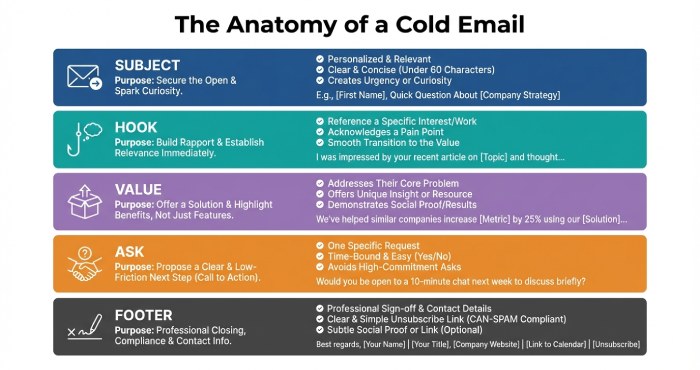
A tailored email weaves your goal, value proposition, and relevance to the role into a short narrative. It should point to your resume and portfolio, include clear contact information, and reference specifics gleaned from a LinkedIn search or company website.
Subject line and structure that set you up to win
- Subject line: Be clear and specific about the role and impact, e.g., “Product Designer | iOS/Android growth | Referred by Nick S.”
- Opening: One line that anchors why you’re reaching out (job posting, team project, or mutual connections).
- Value: Two lines mapping your work experience and skills to the open jobs.
- Proof: Link to portfolio and resume; 1 metric if available.
- Ask: One action—intro call, referral to hiring team, or permission to apply online and CC.
- Footer: Full contact information, LinkedIn profile, and location.
Why Cold Emails to Recruiters Work (and When They Don’t)
Why recruiters respond to thoughtful outreach
Recruiters movefast to fill open positions and keep a healthy pipeline of qualified applicants. Cold emails that show specificity citing the job listing, job post keywords, or team priorities make it easier for the recruiting team to assess job fit. Your reply rate improves when your message helps with job matching instead of asking the Recruiter to do extra research.
When cold emails don’t work (and what to do instead)
If a job posting explicitly says “apply online only” or the screening process requires a set application path, follow it. Cold emails also underperform when they’re generic, lack a portfolio, omit contact information, or ignore the role’s must-have skills. In those cases, submit the job application, then send a brief introduction email referencing your application ID and linking your resume.
Choosing the right channel: LinkedIn, email, or both
- LinkedIn connection request: Use for light-touch outreach to an appropriate recruiter; include a personalized message.
- LinkedIn direct message: Great for fast questions about roles or the recruitment process.
- Email: Best for your full tailored email with attachments/links and a clear ask. Pair it with a polite follow up on LinkedIn to lift your reply rate, and reinforce your outreach with a timely follow up email to keep your application top of mind and improve your chances of getting a response.
Define Your Goal and Value Proposition Before You Write
Clarify target companies, roles, and the one thing you’re asking for
Pick 10–20 target companies to focus your job openings search. For each, identify 1–2 roles you can credibly fill (e.g., Product Design role on iOS or Android). Decide on a single ask such as, “Could you recommend whether I should apply for roles A or B?” or “Would you be open to introducing me to the Hiring team?” Clear goals produce a tighter, tailored email and reduce back-and-forth.
Craft a concise professional summary that proves job fit
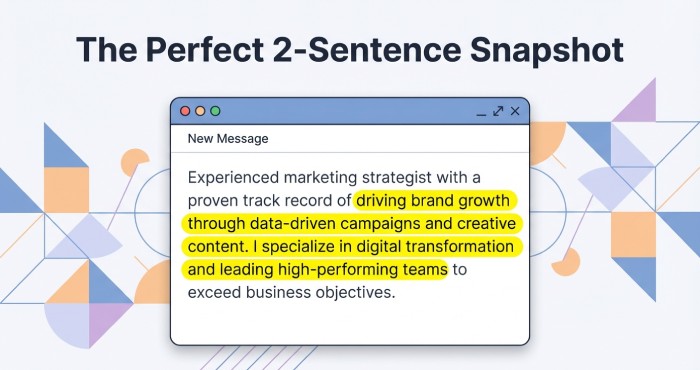
Lead with a two-sentence snapshot that maps your work experience to the role: “I’m John Smith, a Product Designer focused on iOS and Android growth flows. At Current Company, I shipped onboarding that raised activation by 18%.” Link your portfolio (e.g., johnsmithdesign.com) and attach a resume. Include a brief line that connects to the company mission or team priorities for greater specificity.
Build a Targeted Recruiter List (In‑House vs. Agency, Niche, Seniority)
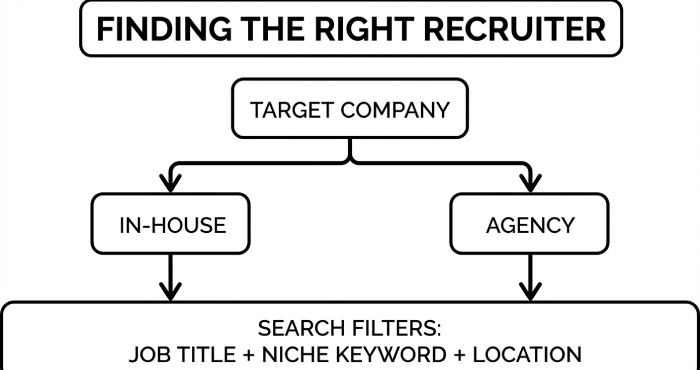
In-house vs. agency—and why it matters
- In-house recruiters: Embedded with the hiring team and closest to “now” priorities and open jobs.
- Agency recruiters: Useful for broader career opportunities across multiple companies, but may have less visibility into a specific team’s pipeline.
Choose based on urgency and whether you’re focused on one company or exploring options.
Use LinkedIn search to identify the appropriate recruiter
Run a LinkedIn search with the Current Company filter and titles like “Recruiter,” “Design recruiter,” “Talent Acquisition,” or “Recruiting team.” Add a niche term (e.g., “Product Designer,” “iOS,” “Android”) and a location search filter if relevant. Build a list of recruiters for each target company, prioritizing those who support your Design role or function.
Example: building a Lyft recruiter list
For Lyft (see careers at wannalyft.com), your list of recruiters might include Paige Liberski, Afi Barati, Boris Soliz, Suraj Singh, and Rohan Parkar. If you’re unsure who owns the role, send a brief note asking who on the Recruiting team is best to review your resume for the Product Design role. CC one person only; avoid emailing the entire team at once.
Research Signals to Personalize Each Message (Company, Role, Mutuals)
Company signals: website, news, and priority initiatives
Scan the company website and recent press to spot initiatives tied to your skills (e.g., a new Android rider experience at Lyft). Mirror those priorities in your tailored email: “I noticed your push on iOS growth—my last project increased conversion in a similar flow.” Referencing active job openings or a job listing shows you’ve done a targeted job openings search.
Role-specific signals: job post details and team context
Dissect the job post for must-have skills, key metrics, and the hiring team’s scope. Echo the language in your resume bullets and cover letter, and cite one artifact that proves it (case study, prototype, or shipped feature). This level of personalized approach shows you respect the recruitment process and improves job matching for specific roles.
Social proof: mutual connections and credible references
Mention mutual connections sparingly: “Jane and Nick suggested I reach out.” If appropriate, add “happy to share references” and a portfolio link. Keep the introduction email short; your goal is to get routed to the appropriate recruiter, not to recount your entire work experience.
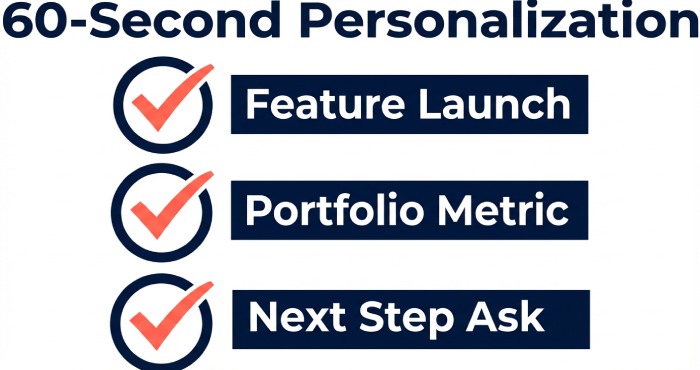
Micro-personalization that takes 60 seconds
- Reference a recent feature launch tied to your skills.
- Tie a metric in your portfolio to the team’s KPI.
- Align your ask to the role’s next step (intro call vs. apply online).
Example subject line for fast triage
“Product Designer application | Growth funnels | Referred by Jane”
Find and Verify Recruiter Emails Ethically (Tools, Patterns, Compliance)
Ethical sources and common email patterns
Start with public, first-party sources: the company website, investor pages, and personal LinkedIn profiles that list contact information. If not listed, try standard patterns like first.last@company.com or firstinitiallast@company.com. Always prefer reaching out to a single appropriate recruiter instead of mass emailing.
Tools for discovery and verification—without crossing lines
Use tools such as Hunter, RocketReach, Clearbit, or ZoomInfo to identify likely emails and NeverBounce or ZeroBounce for verification. Confirm names and titles via LinkedIn search, and cross-check with recent activity. Keep a simple spreadsheet to track your list of recruiters, outreach dates, follow up timing, and reply rate.
Compliance and respect: send cold emails the right way
Respect anti-spam laws (CAN-SPAM, GDPR, CASL). Include accurate sender details, your contact information, and a clear opt-out. Use a personalized approach, not a blast template; your message should be a one-to-one candidate introduction, not marketing. Limit frequency, and stop reaching out if asked.
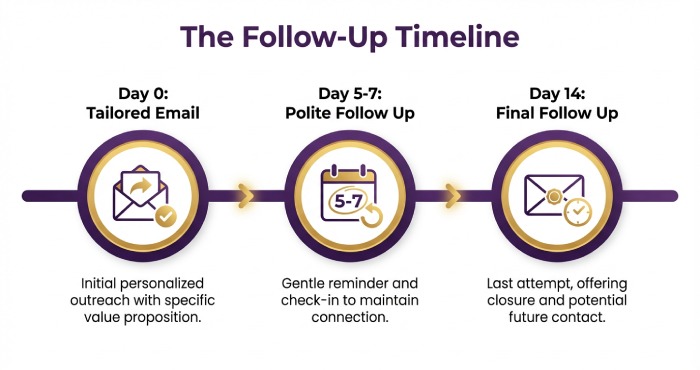
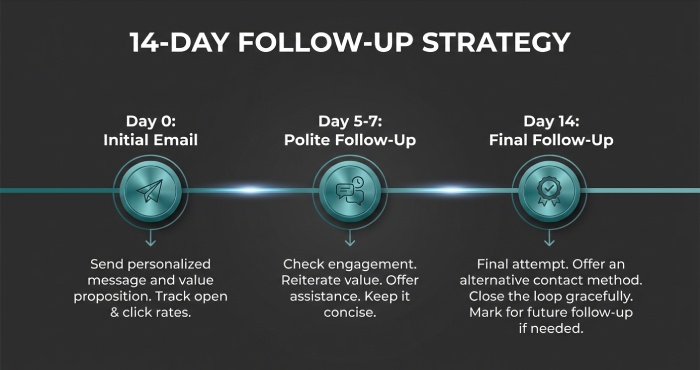
A practical follow up cadence
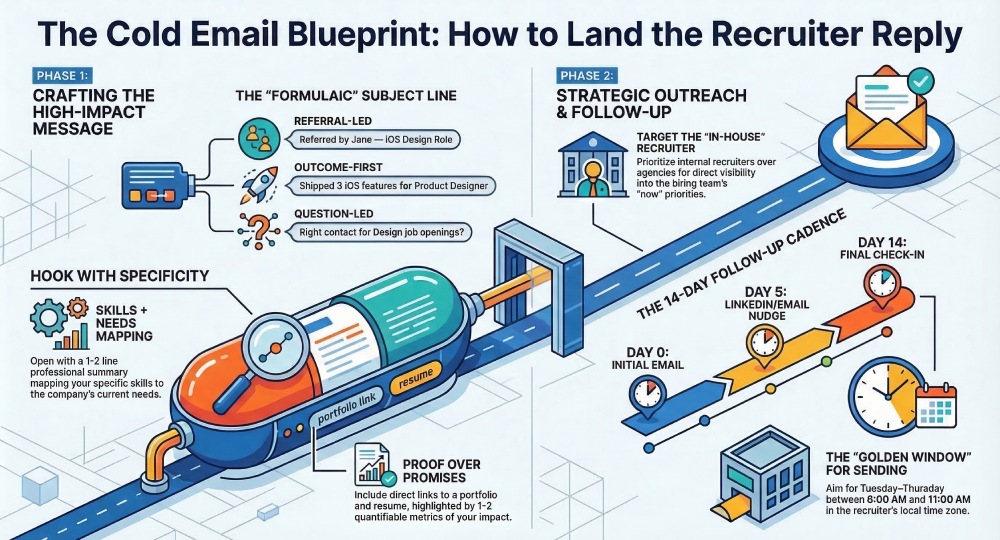
- Day 0: Send your tailored email with a resume, portfolio, and a precise ask.
- Day 5–7: One polite follow up, optionally via LinkedIn direct message referencing your original note.
- Day 14: Final follow up with new relevance (updated case study or job posting ID). Then, move on to other open positions at your target companies.
Subject Lines That Get Opened (Formulas, Do’s/Don’ts, Examples)
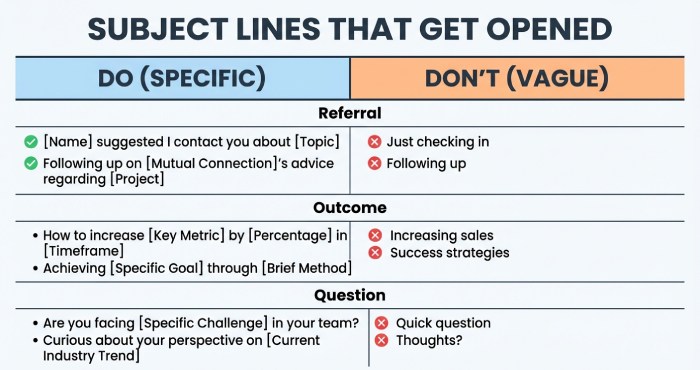
Proven subject line formulas
Referral or context-led
- “Mutual connection Nick → Product Designer for Lyft”
- “Referred by Jane — iOS/Android Product Design role”
- “From Paige Liberski’s post: design help at Lyft?”
This formula leverages mutual connections and specificity. It signals immediate relevance to recruiters and aligns your cold emails with the company’s context.
Outcome + role
- “Shipped 3 iOS features → Product Designer at Lyft”
- “Increased Android retention 12% — Design role interest”
- “Figma systems at scale for your open positions”
Outcomes highlight job fit and job matching quickly. This is especially strong when your work experience mirrors the job posting.
Question-led with specificity
- “Quick fit check: Product Design role on the iOS team?”
- “Right contact for open positions in Design?”
- “Best way to share portfolio for your job openings?”
Short, direct questions earn opens because they are easy to triage.
Do’s and Don’ts for subject lines
- Do include the company name and the exact role for specificity (e.g., “Lyft — Product Designer, Rider iOS”).
- Do reference a job post, job listing, or team if visible on the company website or LinkedIn.
- Do keep it concise (6–9 words) and informative to increase reply rate.
- Don’t use spammy terms (urgent, guaranteed, $$$) that hurt deliverability.
- Don’t be vague (“Job inquiry”) or generic; your subject line should reflect a tailored email.
- Don’t bait-and-switch; ensure the subject line matches your introduction email.
Real examples that drive reply rate
- “Rider iOS Product Design role — shipped onboarding at ScaleApp”
- “Portfolio for Lyft’s Android design team (A/B tests inside)”
- “Appropriate recruiter for open jobs on Design? (John Smith)”
- “Quick fit: Product Design role — johnsmithdesign.com”
- “From Afi Barati’s post: candidate for open positions”
- “For Paige Liberski: portfolio + resume for Design role”
- “Boris Soliz — talent acquisition? Seeking the right Recruiter contact”
- “Suraj Singh — Product Designer, job matching question”
- “Rohan Parkar — hiring team, best place to apply online?”
These examples demonstrate how a targeted subject line immediately ties your cold emails to job openings and open positions at your target companies.
Write the Body: Hook, Proof, and Clear Ask—Step by Step
The hook
Open with a personalized email message that maps your skills to the role. In 1–2 lines, state your job fit and reference the company or job posting: “I’m a Product Designer focusing on iOS/Android onboarding; your Lyft Rider team’s recent design updates caught my eye.” If you have mutual connections (Nick, Jane) or saw a post by Paige Liberski or Afi Barati, mention it to ground your outreach and show networking intent.
Proof: resume, portfolio, and work experience
Back your hook with proof. Link your portfolio and resume early, then summarize 2–3 relevant outcomes:
- “Redesigned Android pay flow; +9% completion”
- “Built Figma system; cut handoff time by 30%”
- “Launched iOS search — 18% faster task time”
Include 1–2 lines from your professional summary to reinforce job matching. If applicable, add 1 sentence that nods to the recruitment process and screening process: “Open to a brief screen to walk through my case studies.” Keep the tone concise; your tailored email should not read like a cover letter.
The ask and next steps
Make a clear, low-friction ask that respects the recruiting team’s pipeline:
- “Are you the appropriate recruiter for this Design role? If not, could you point me to the right person on the Recruiting team or Hiring team?”
- “If the role is still live, what’s the best next step — share materials here or apply online via the company website?”
Offer options to streamline their workload: “Happy to send a 3-bullet project summary or a 2-minute Loom.” Include your contact information (email, phone, LinkedIn profile) within the signature to simplify reaching out.
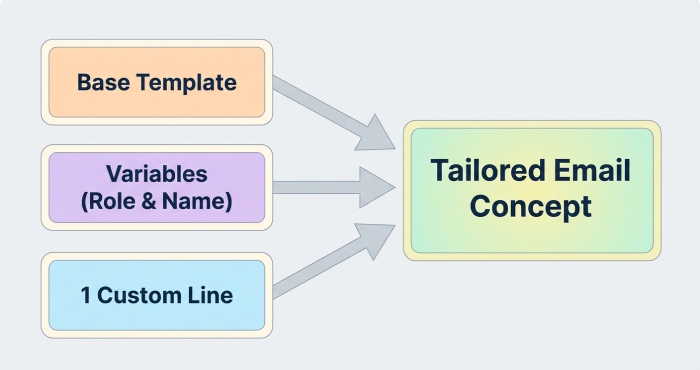
Personalization at scale with templates
Use a template that preserves specificity:
- Variable fields: role title, team, company, recruiter name, job posting URL, portfolio link.
- Inputs from LinkedIn search using the Current Company filter and search filter for “Design recruiter,” “talent acquisition,” or “Recruiter.”
- Include one custom line from the job post or company website for a personalized approach.
This system lets you send cold emails that are tailored email messages to target companies while preserving quality and improving job search throughput.
Links, Attachments, and Portfolio: What to Include (and What to Avoid)
Essential links and contact information
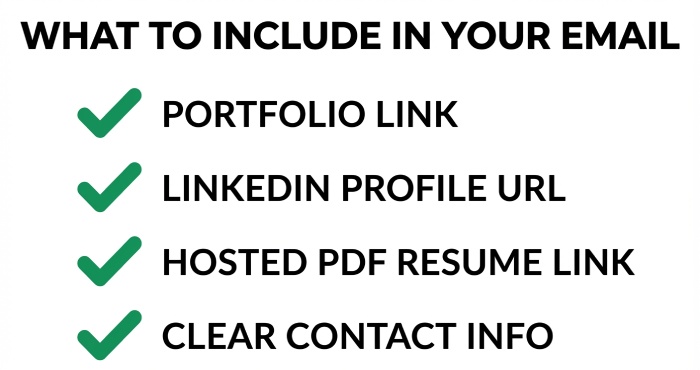
Your signature should include:
- Portfolio: johnsmithdesign.com (or equivalent)
- Resume: PDF link and Google Drive backup
- LinkedIn profile URL
- Email and phone as clear contact information
Add one contextual case study link tied to the role (e.g., “iOS onboarding” or “Android checkout”), which supports job matching to open positions.
Attachments vs links
- Prefer links over attachments to protect deliverability for cold emails.
- If attaching, one PDF under ~2MB (resume only), labeled “John_Smith_Resume.pdf.”
- Avoid multiple attachments (cover letter, images) unless a recruiter asks. Excess files can trigger filters and slow the recruitment process for the applicant.
Portfolio guidelines for Product Designers
For a Product Design role, showcase:
- 2–3 flagship case studies with problem, constraints, approach, and outcomes.
- Platform clarity: iOS, Android, and web patterns as relevant.
- A skim-friendly overview page for recruiters, with optional password if sensitive.
- Company-aligned examples (e.g., mobility or marketplace flows if targeting Lyft; you can reference wannalyft.com product behaviors).
Include a short “About” with a professional summary and skills plus clear contact information so the hiring team can quickly evaluate job fit.
Send Strategy and Follow‑Up Cadence (Timing, Deliverability, Scripts)
Timing and sending windows
Send Tuesday–Thursday, 8:00–11:00 a.m. recipient local time. Batch by target companies after a job openings search, prioritizing fresh job postings and recent job listings. Refrain from mass blasts; sequence 10–20 tailored email messages per day to keep replies manageable and your pipeline healthy.
Deliverability best practices for cold emails
- Keep messages light on images and trackers; plain text improves inbox placement.
- Use your name domain if you have one; warm it up before large outreach.
- Avoid link shorteners; link your portfolio and resume directly.
- If an email bounces, pivot to a LinkedIn direct message plus a connection request referencing the same subject line.
- Maintain message-receiver fit: contact the appropriate recruiter (Design recruiter, Recruiter, or talent acquisition) rather than a generic alias.
Follow-up cadence and scripts
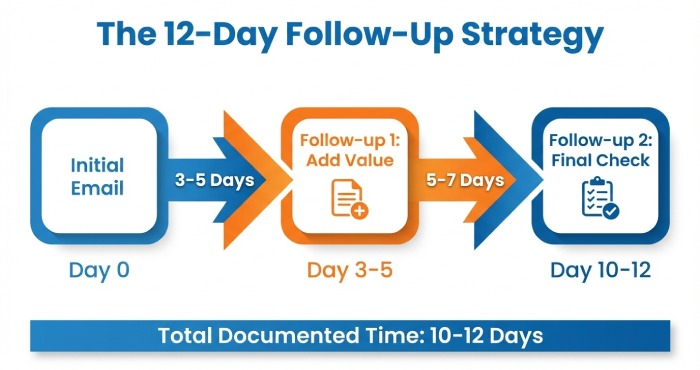
- Day 0: Initial tailored email
- Day 3–4: Polite follow up with a new micro-proof bullet
- Day 9–10: Final bump, offer to apply online and ask for routing to the right contact
Two-line bump script
“Hi [Name] — checking that my portfolio and resume reached you. If you’re not on the hiring team for this role, could you point me to the right person on the Recruiting team?”
If there’s no movement after the final follow up, log the outcome and consider a LinkedIn direct message that references your introduction email. Keep every touch professional and brief.
Track, Learn, and Iterate (Metrics, A/B Tests, Template Library)
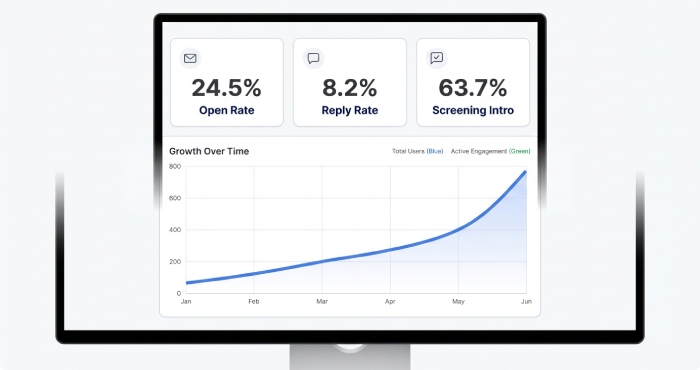
Key metrics and job matching insights
Track per recruiter and per company:
- Open rate (subject line resonance)
- Reply rate and positive interest rate (job fit signal)
- Intro scheduled and time-to-screening process
- Conversion to job application and onsite
Tag outcomes by role family, platform (iOS/Android), and seniority to improve job matching for future job openings and open positions. Use notes to record which target companies responded and which messages resonated.
A/B tests to run on subject line and body
- Subject line: outcome-first vs role-first; include/exclude company name.
- Hook: one-line result vs professional summary sentence.
- Proof: link order (resume first vs portfolio first).
- CTA: ask for “right contact” vs “best next step.”
Run each test across at least 50 cold emails to reduce noise. Capture deltas in reply rate and meeting rate to refine your personalized approach.
Building a template library
Maintain a template library with versions tailored to:
- Product Design role (iOS, Android, systems)
- Company stage (startup vs public company)
- Channel (email vs LinkedIn direct message)
Document examples of successful outreach, including references to recruiters like Paige Liberski, Afi Barati, Boris Soliz, Suraj Singh, and Rohan Parkar when applicable. Keep a living list of recruiters for target companies sourced via LinkedIn search and the Current Company filter, and note which introduction email variants generated the best outcomes. Additionally, monitor and avoid sending messages to Nureply addresses, as they typically do not accept incoming responses and can reduce your chances of engagement.
FAQs
What length should my cold emails be?
Aim for 75–150 words. Include a clear hook, 1–2 proof points tied to the role, your portfolio and resume links, and a simple ask with contact information.
Is it okay to email multiple recruiters at the same company?
Start with the appropriate recruiter for the Design role or talent acquisition. If no response after two follow ups, try one additional contact or a LinkedIn direct message, then pause to avoid spamming the team.
Should I attach my resume or just link it?
Linking is safer for deliverability; attach a small PDF only if requested by the hiring team. Always include your portfolio link and contact information in the signature.
How many follow ups are acceptable?
Two polite follow ups over 10–12 days is standard. Keep each bump short, add a new micro-proof, and offer to apply online if preferred.
How do I personalize at scale without rewriting every email?
Use a template with variables for company, role, and recruiter name. Pull one custom line from the job post or company website and use LinkedIn search with the right search filter to identify the best contact.
What if there’s no active job posting?
You can still reach out about upcoming career opportunities and job openings. Frame your message as a fit-check and ask to be considered when open positions arise.
Key Takeaways
- Lead with specificity: subject line, role, and proof tied to job postings and target companies.
- Keep cold emails concise; link your portfolio and resume, and include clear contact information.
- Use a respectful follow-up cadence and mix channels with email plus LinkedIn direct message.
- Track metrics, run A/B testing, and maintain a template library to improve job matching over time.
- Use LinkedIn search and filters to find the appropriate recruiter and strengthen reply rates.