
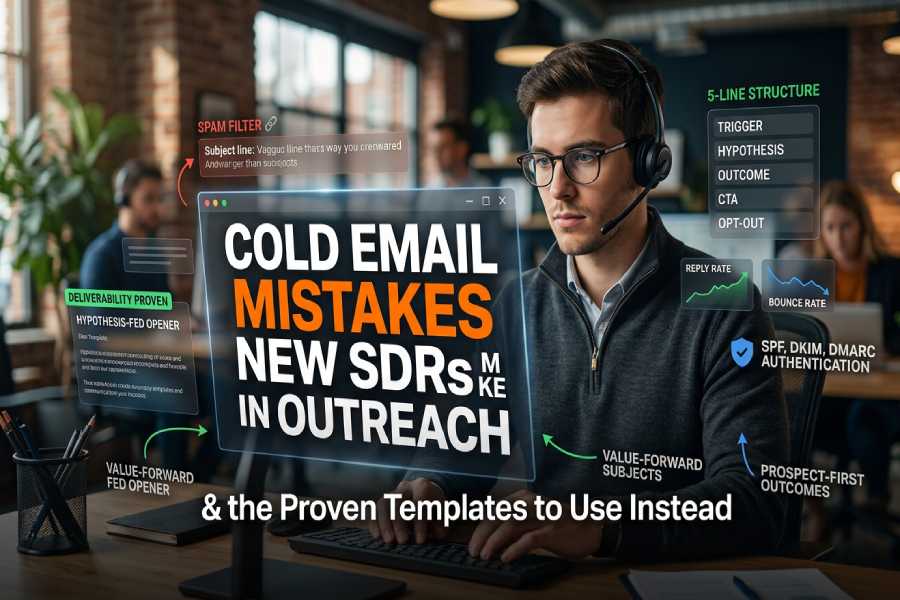
Cold Email Mistakes New SDRs Make In Outreach—And The Templates To Use Instead
New SDRs don’t lose deals only because of copywriting mistakes they also get tripped up by infrastructure and process mistakes that crush deliverability and reply rate. The biggest cold email mistakes often combine vague messaging, bad data, and poor DNS authentication, which trip the spam filter and erode email reputation. Use the templates below and keep your primary domain, inbox warmup, sending limits, and shared SMTP environment in mind whether you’re on Google Workspace or Outlook 365.
Mistake #1: Clickbait or vague subject lines — Use value-forward, context-tied subject templates
Why this kills replies (and sends you to spam)
Generic subject lines promise nothing, miss buyer psychology, and feel like ads. Worse, certain phrasing plus tracking links and over-formatting trigger the spam filter. On Gmail or Outlook 365, exceeding sending limits or mailing from a shared SMTP without proper DNS authentication (SPF, DKIM, DMARC) tanks deliverability and reply rate especially if you blast from your primary domain without inbox warmup.
Use these subject templates instead
Tie the subject line to context, value, and the prospect’s pain points. Aim for a concise message that’s a conversation starter, not a pitch.
- For ICP-fit cost savings:
- “[Prospect’s region] ops leaders cut [cost line item] 23%—how?”
- “Acme case study: 14-day payback on [problem]”
- For risk or timing:
- “Q2 [metric] trend at [Company]—worth a 7-min gut check?”
- “Noticed [tool in Tech Stack]—quick idea to reduce [pain]”
- For social proof:
- “How AEs at [peer company] halved no-shows”
- “[Industry] teams using [your category] to fix [pain]”
H5 Deliverability note:
- Keep subjects in plain text; avoid emojis and gimmicks that spark a spam filter check.
- If you must test curiosity-based variants, A/B with email testing tools and watch reply rate, not just open tracking (tracking pixel can be blocked).
Infrastructure watchouts for subject lines
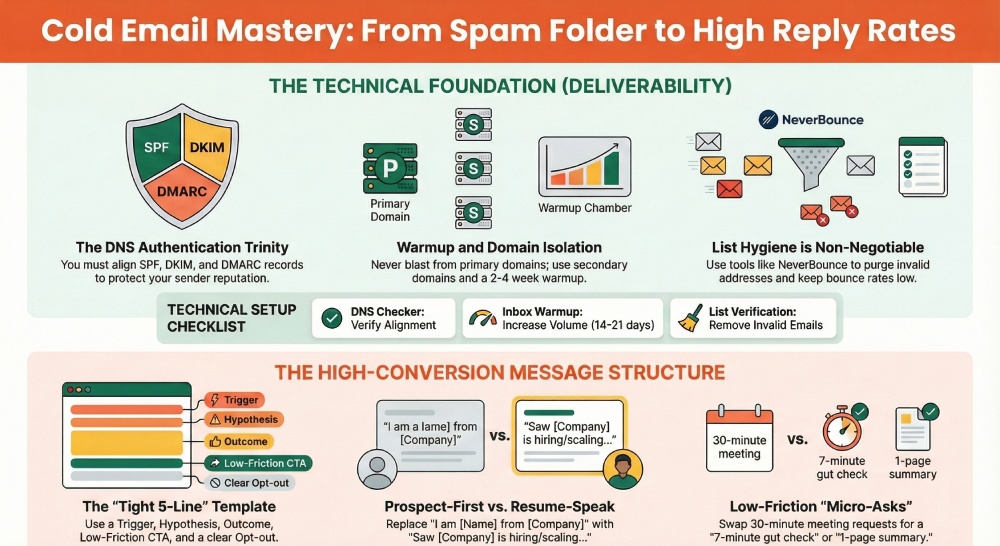
- Authenticate on your sending domain: set up SPF, DKIM, and DMARC. Use DNS Checker to confirm records and Blacklist Checker to ensure you’re not flagged; this protects email reputation and deliverability.
- Warm new or secondary domains with gradual sending. Inbox warmup tools (e.g., Puzzle Inbox) help you respect Google Workspace and Outlook 365 sending limits.
- Avoid blasting from a shared SMTP pool; it inherits other senders’ behavior and can corrupt sender reputation if they ignore CAN-SPAM or lack an unsubscribe option.
Mistake #2: Opening with “I” and resume-speak — Use prospect-first, problem-led openers
Why this fails
Leading with “I’m [name] from [company]” centers you, not the prospect. It ignores buyer psychology and relevance, reads like feature selling, and depresses reply rate. A prospect-first, human tone shows you’ve done targeting against your ICP and are proposing a specific outcome.
Prospect-first openers (plug-and-play)
- “Saw [Company] hiring 4 AEs—are ramp times stuck above 60 days?”
- “You’re on Google Workspace + [CRM]; teams like [peer] cut CSAT escalations 18% by fixing [pain].”
- “If [Prospect’s tool] is your go-to for renewals, we found a 2-step gap causing 12–18% churn risk. Quick check?”
- “Noticed [engagement signals: new product, funding, region expansion]. What’s your plan for [pain] as volume doubles?”
H5Conversation starters to test:
- “Open to a 5-min sanity check if I’m off?”
- “Happy to send a one-pager or vanish—what’s helpful?”
Tip: Use Copy Analyzer to tighten email copy and keep the opener under 30 words. Avoid over-formatting and heavy branding; plain text emails often land better and improve deliverability.
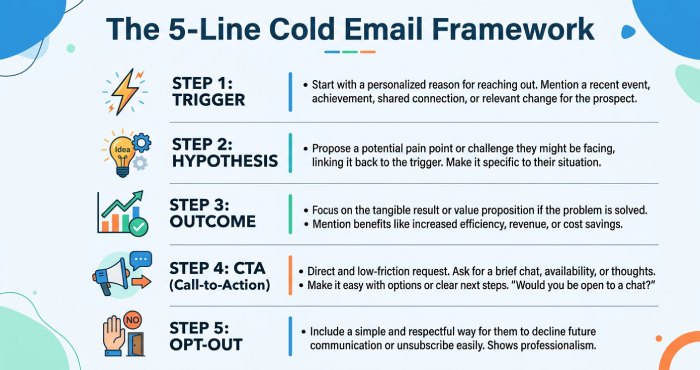
Mistake #3: Walls of text and fluff — Use the tight 5-line cold email structure template
Why long emails backfire
On mobile device info views, skimmability rules. Walls of text look like a brochure, can trigger the spam filter, and reduce deliverability. Short, plain text emails protect email reputation across Gmail and Outlook while boosting reply rate. Also, too many links or images can trip filters—especially on a shared SMTP or when your SPF, DKIM, and DMARC aren’t aligned.
The 5-line structure (template)
- Trigger: “Saw [hiring/stack/news] at [Company].”
- Hypothesis of need: “Guessing [team] loses [X] hours/wk to [problem].”
- Outcome: “We help [peer/ICP] reduce that by [metric]% in [timeframe] (happy to share the Acme case study).”
- CTA: “Worth a 7-min call to pressure-test? If not, point me to who owns this.”
- Opt-out: “If this isn’t relevant, reply ‘no’ and I’ll remove you.”
Compliance and tracking tips:
- Include a clear unsubscribe mechanism to respect CAN-SPAM (an unsubscribe option or direct “reply ‘stop’” is fine in cold 1:1 outreach).
- Minimize tracking links in the first touch; open tracking relies on a tracking pixel that can impact deliverability. Use data-driven adjustments from actual reply rate, not just opens.
Mistake #4: Feature dumping instead of outcomes — Use hypothesis-of-need + outcome framing templates
Why feature selling stalls
Listing features shifts cognitive load to the reader. Prospects want proof you understand their pain points and can deliver specific outcomes. Anchor your message in measurable results, social proof, and a next step.
Outcome-framed templates
- Hypothesis + Proof:
- “Most Support teams on Outlook 365 see 10–15% slower first response during spikes. We helped Acme’s Customer Support hit sub-3 min FRT for 92% of tickets—without adding headcount.”
- Metric + Time:
- “AEs at [peer] cut admin time 6 hrs/wk and lifted opp hygiene 21% in 30 days.”
- Risk + Mitigation:
- “Teams running sequences from a primary domain with weak SPF/DKIM/DMARC see reply rate decay after week 2. We isolate sequences to a secondary domain, maintain inbox warmup, and protect email reputation.”
H5Follow-up sequence that compounds outcomes
- Touch 1 (value hypothesis) → Touch 2 (case study link; keep link count low) → Touch 3 (objection-handling) → Touch 4 (breakup, offer resource).
- Timing: 3–4 business days between touches; watch engagement signals (opens, clicks, soft-bounces) for purchase intent.
- Tools: Use Polymail Sequences or Puzzle Inbox for automation, read tracking, and data-driven adjustments. Calibrate cadence to Google Workspace/Outlook 365 sending limits and never blast from a shared SMTP (Simple Mail Transfer Protocol).
- QA: Run Spam Checker and Copy Analyzer before launch; monitor Blacklist Checker weekly.
Mistake #5: Irrelevant or over-the-top personalization — Use persona/problem mapping and light personalization templates
Why this misses
Dropping trivia from LinkedIn without a tie to outcomes signals low relevance. Targeting mistakes and bad data produce invalid email addresses, elevate bounce rate, and trash deliverability. If verified inboxes aren’t used, your email reputation suffers—especially when SPF, DKIM, and DMARC are misconfigured and you exceed sending limits on Google Workspace or Outlook 365.
Persona/problem mapping (light personalization)
Map problem → persona, then add a single line to anchor relevance.
- Founder/CEO:
- “Noticed your hiring post—guessing founder-led deals are heavy. We help Founders standardize discovery so AEs self-sufficiently hit 3x pipeline.”
- VP Sales / AEs:
- “Your AEs use Gmail + [Sales engagement]. Teams like [peer] recovered 12% of stalled opps by fixing handoff notes and no-show patterns.”
- Customer Support:
- “With [tool] in your Tech Stack, most CS orgs miss service level agreement (SLA) during incident spikes. We auto-route by device info and language to cut backlog 28%.”
- Internal Communication:
- “Rollouts via Outlook 365 often see <35% read rates. We’ve lifted internal read tracking to 62–74% with simpler sequencing.”
Templates:
- “If [role] owns [metric], open to a 5-min check on [problem] that added [KPI] at [peer]?”
- “Happy to share a 1-pager or case study; if not your lane, who should I bug?”
Data and infrastructure checklist
- List verification: Use ZeroBounce or NeverBounce to remove invalid email addresses before launch; this lowers bounce rate and protects deliverability and email reputation.
- Authentication: Ensure DNS authentication is tight—SPF, DKIM, and DMARC must align at the subdomain you’re sending from; confirm with DNS Checker.
- Domain strategy: Don’t prospect at volume from your primary domain. Warm a matching secondary domain first; maintain inbox warmup and keep daily volume within sending limits on Google Workspace and Outlook 365.
- Environment: Avoid shared SMTP pools; isolate your infrastructure to protect sender reputation. If you must, monitor with Blacklist Checker and tighten CAN-SPAM adherence with a visible unsubscribe option.
Authentication essentials (repeat because it matters)
- SPF: Authorize your mail servers; misaligned SPF invites the spam filter.
- DKIM: Cryptographic signing that boosts trust and deliverability.
- DMARC: Enforces alignment; required to stabilize reply rate at scale.
Sending domain tactics
- Use an Inbox Calculator to plan daily volume and ramp. Start with plain text emails, minimal links, and short sequences.
- Keep follow-up emails brief and additive; a 3–4 step sequence usually sustains reply rate without triggering filters.
- For Outlook 365 and Google Workspace, respect daily caps and throttle automation; too-rapid sends resemble bot behavior and attract the spam filter.
Operational note: Coordinate with Sales Ops so your Sequence logic doesn’t double-email the same prospect across teams. Maintain an unsubscribe mechanism that works across all tools (Polymail, Gmail, Outlook). Keep infrastructure tidy, copy tight, and targeting precise, and these cold email mistakes turn into a predictable pipeline motion.
Mistake #6: Thin credibility or missing proof — Use micro–case study and social-proof snippet templates
Why proof strengthens reply rate and buyer psychology
A lack of proof is one of the most costly cold email mistakes because buyers scan for fast credibility cues. Micro–proof accelerates trust, reduces risk perception, and increases reply rate by making your email copy feel grounded in real outcomes rather than feature selling. Anchor benefits from pain points that your ideal customer profile (ICP) actually cares about, then compresses the proof into skimmable snippets that work as a conversation starter and maintain a human tone.
Micro–case study templates that fit in 2–4 lines
Use these compact formats when you need proof without over-formatting or long paragraphs.
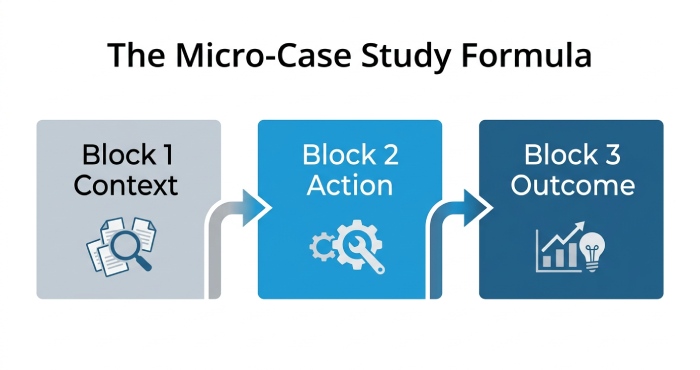
Template: 3-line micro–case study
- Context: “For Acme’s AEs, calendar gaps were tied to low inbound volume.”
- Action: “We paired a warm outbound Sequence with SDR call blocks; integrated with their Tech Stack.”
- Outcome: “Net +31% pipeline in 60 days; 18% higher reply rate from plain text emails.”
- H5 Guidance: Insert social proof “chips”
- Named logos (with permission), sector tags (“Series B SaaS”), or role-based relevance (“Head of Sales @ mid-market”) act as quick social proof. Add one number (time-to-value, cost drop, or revenue lift) to maintain a concise message.
- H5 Guidance: Avoid common copywriting mistakes
- Skip feature selling; tether outcomes to felt pain points. Use a subject line that tees up proof (“Quick win for [Role]: 31% pipeline bump at [Peer]”) instead of generic subject lines.
Social-proof snippets you can paste in subject lines and body
- Subject line options:
- “Playbook peers used to cut response times 27% (2-min read)”
- “[Peer] cut no-show rate 19% with this 2-step follow-up sequence”
- Body options:
- “Used by teams in Sales and Customer Support; rollout <1 day.”
- “Cited by a Founder at [Peer] as the ‘quickest win’ last quarter.”
- H5 Deliverability note
- Resist image-heavy logos and multiple tracking links; they can trip a spam filter. If you rely on open tracking, remember the tracking pixel is blocked by many clients and can hurt deliverability at scale.
Mistake #7: Vague asks and high-friction CTAs — Use specific, low-friction CTAs and calendar options
What makes a CTA high-friction
Ambiguous asks, multipurpose links, or forcing a long meeting too early are classic cold email mistakes. Replace “do you have 30–45 minutes?” with specific, low-commitment choices that respect buyer psychology and increase reply rate.
Low-friction CTA templates that convert
- H5 Binary micro-asks
- “Worth a 7-min overview, or should I circle back next quarter?”
- “Should I send a 1-page summary, or a 90-second loom?”
- H5 Time-boxed calendar options
- “Two quick options: Tue 10:20a or Thu 2:10p [your TZ]. If neither, I’ll send the 1-pager.”
- Include a respectful unsubscribe option (“If not relevant, reply ‘no’ or use the unsubscribe mechanism below.”) to stay aligned with CAN-SPAM and protect sender reputation.
- H5 CTA for sequence progression
- Offer a “lightweight first step” (ROI snapshot, case study PDF, or benchmark from your Inbox Calculator) to advance the sequence without unnecessary friction.
Mistake #8: One-and-done outreach — Use a 4–6 touch follow-up sequence with fresh value templates
A 4–6 touch follow-up sequence that adds value
One email rarely aligns with timing or purchase intent. Build a follow-up sequence of 4–6 touches over 14–21 days, each adding fresh value so it doesn’t feel like nagging.
- H5 Touch-by-touch ideas
- T1: Problem primer + micro–case study.
- T2: 90-second loom: workflow gap and before/after.
- T3: Social proof: 2-sentence win from a peer role; link to case study.
- T4: Benchmark or checklist (e.g., deliverability self-audit).
- T5: “Breakup” value: template pack or Copy Analyzer score of their current outreach.
- T6: Timing opener tied to a trigger (hiring, funding, Tech Stack change).
Automation, engagement signals, and data-driven adjustments
Use tools like Polymail Sequences or Puzzle Inbox to monitor engagement signals (replies, link clicks, device info). Prioritize data-driven adjustments rather than guesswork: alter the subject line, tighten the concise message, and refine personalization when response stalls. Limit open tracking, because the tracking pixel can degrade email deliverability and provoke a spam filter in some environments.
Test quickly and keep the human tone
Run lightweight email testing across message variants. Keep a human tone; aim for a short conversation starter, not a pitch deck. Use automation sparingly so your follow-up emails remain relevant and don’t trigger process mistakes.
Mistake #9: Poor targeting, timing, and list hygiene — Use trigger-based targeting, segmentation, and timing openers
Tighten ICP, segmentation, and targeting to avoid bad data
Targeting mistakes compound most cold email mistakes. Define ICP by firmographics, role, Tech Stack, and problem maturity, then segment messaging for Prospect roles like Founder, AEs, or Heads of Customer Support and Internal Communication. Reference LinkedIn triggers (new hiring, new tool adoption) to establish relevance and avoid copywriting mistakes.
- H5 Timing openers and purchase intent
- “Saw you hired 3 AEs—are you ramping outbound?” or “Noticed the switch to Microsoft/Google Workspace in the Tech Stack—need to revisit routing?”
- Use engagement signals (site visits, webinar attendance) to time outreach when purchase intent is highest.
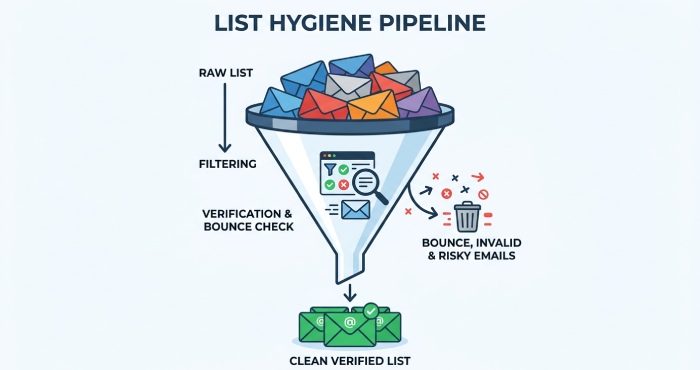
List verification and hygiene to lower bounce rate
Hygiene affects reply rate and deliverability. Use list verification from ZeroBounce or NeverBounce to purge invalid email addresses and protect verified inboxes. Monitor bounce rate and run your domains through DNS Checker and Blacklist Checker prior to large sends; remove bad data from your pipeline fast.
- H5 Personalization that scales
- Use role-based lines that show you did homework without over-formatting: “If [Acme] is centralizing support SLAs, this 2-step deflection play may help.”
Mistake #10: Deliverability and formatting blunders — Use mobile-first, plain-text layouts, smart signatures, and opt-out language templates
Set up rock-solid infrastructure and DNS authentication
Deliverability is not optional; it’s foundational. Configure DNS authentication—SPF, DKIM, and DMARC—on your primary domain and any sending subdomain. Proper DNS authentication (SPF, DKIM, DMARC) protects email reputation, improves deliverability, and keeps you out of the spam filter.
- H4 Core checklist and tools
- DNS authentication: confirm SPF, DKIM, and DMARC alignment with DNS Checker; fix failures before you scale.
- Reputation: check blocklists with Blacklist Checker; run creative through a Spam Checker before campaigns.
- Volume: respect sending limits; use an Inbox Calculator to estimate risk as you scale.
- H5 Know your stack: Google Workspace, Outlook 365, and shared SMTP
- Google Workspace and Outlook 365 both enforce sending limits and can throttle shared SMTP relays. Avoid blasting from a brand-new mailbox; shared SMTP plus sudden volume spikes are spam filter magnets that wreck email reputation and deliverability.
- If you must use a shared SMTP, ramp gradually and authenticate properly with SPF, DKIM, and DMARC.
- H5 Ramp like a pro: inbox warmup and primary domain safety
- Run a 2–4 week inbox warmup before scale: low-volume sends, real replies, and gradual increases to protect email reputation. Keep your primary domain safe—consider a dedicated subdomain once you’re confident in deliverability. Even with warmup, sending limits still apply in Google Workspace and Outlook 365, so pace growth.
Formatting rules: plain text emails, smart signatures, and compliant opt-out
Formatting can make or break deliverability. Choose mobile-first, plain text emails with minimal links and zero heavy images; multiple tracking links or a tracking pixel can trigger a spam filter. Keep branding light; a clean, smart signature with your name, role, company, and city suffices.
- H5 Legal and user-friendly unsubscribe language
- Include a clear unsubscribe option to satisfy CAN-SPAM and reduce complaints: “If this isn’t relevant, reply ‘no’ or click here to opt-out.” A respectful unsubscribe mechanism improves sender reputation and long-term deliverability.
Troubleshooting deliverability when metrics sag
If reply rate drops, audit SPF, DKIM, and DMARC, then re-check DNS authentication and alignment. Confirm you’re under sending limits and not relaying through a noisy shared SMTP. In Google Workspace, Outlook 365, Gmail, and Outlook, domain age, inbox warmup history, and email reputation all influence the spam filter; adjust volume, prune cold segments, and revisit authentication.
Tools like Polymail, Puzzle Inbox, and Polymail Sequences can help assess thread behavior; run copy through a Copy Analyzer and subject lines through an Email Testing workflow before the next Sequence. Incorporating platforms like Nureply can further help optimize outreach performance, monitor engagement, and improve reply rates through smarter automation and deliverability insights.
FAQs
How many proof points do I need in a cold email?
Use one strong micro–case study or two brief social proof snippets. Too many numbers can look like feature selling; keep it short and tie proof directly to the prospect’s pain points.
What’s an ideal follow-up sequence length?
Aim for 4–6 touches over 2–3 weeks. Each touch should introduce fresh value—templates, benchmarks, or a brief loom—rather than repeating the same ask.
How do I protect deliverability as I scale?
Authenticate with SPF, DKIM, and DMARC, respect sending limits, and run an inbox warmup for new mailboxes. Avoid shared SMTP volume spikes, reduce tracking links, and monitor blocklists regularly.
Which tools help with list hygiene and reputation?
Use ZeroBounce or NeverBounce for list verification, DNS Checker for DNS authentication, and Blacklist Checker for reputation. A Spam Checker and Copy Analyzer can catch risky phrasing before launch.
Should I use open tracking in cold outreach?
Use it sparingly. A tracking pixel can be blocked and may hurt deliverability at scale; prioritize replies and positive engagement over vanity opens.
What CTAs work best in early emails?
Low-friction micro-asks like “send the 1-pager or a 90-sec loom?” perform well. Offer two specific time slots or a lightweight next step rather than pushing a 30–45 minute meeting.
Key Takeaways
- Social proof and micro–case studies boost reply rate by connecting outcomes to real pain points.
- Use 4–6 touch follow-up sequences with fresh value, not repeated nudges.
- Tight ICP, segmentation, and list verification reduce bounce rate and improve relevance.
- Deliverability depends on SPF, DKIM, DMARC, inbox warmup, and respecting sending limits.
- Favor mobile-first, plain text emails with clear unsubscribe options to avoid the spam filter and protect email reputation.