

7 Ways To Use A Cold Email AI Bot To Personalize Outreach At Scale
Personalizing outreach while maintaining scale has always been one of the biggest challenges in cold email marketing. With the rise of AI-powered tools, businesses can now deliver highly relevant messages without sacrificing efficiency. A cold email AI bot can analyze prospect data, tailor messaging, and automate personalization across thousands of contacts while still making each email feel human and thoughtful.
From dynamic subject lines to context-based messaging and behavior-driven follow-ups, AI is transforming how sales and marketing teams approach outreach. In this article, we explore seven powerful ways to use a cold email AI bot to personalize outreach at scale, helping you increase engagement, improve response rates, and build stronger connections with potential customers.

What a cold email AI bot is and why personalization at scale beats traditional mail-merge
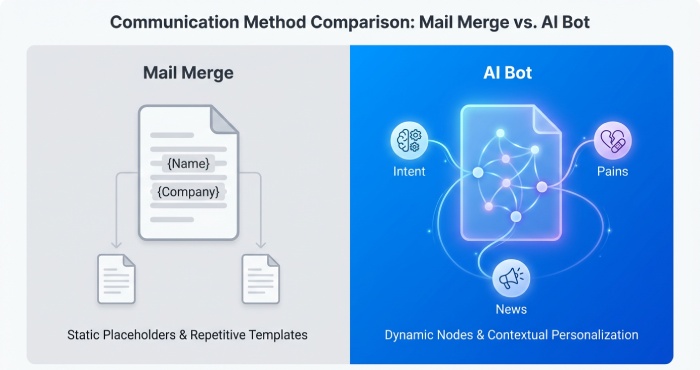
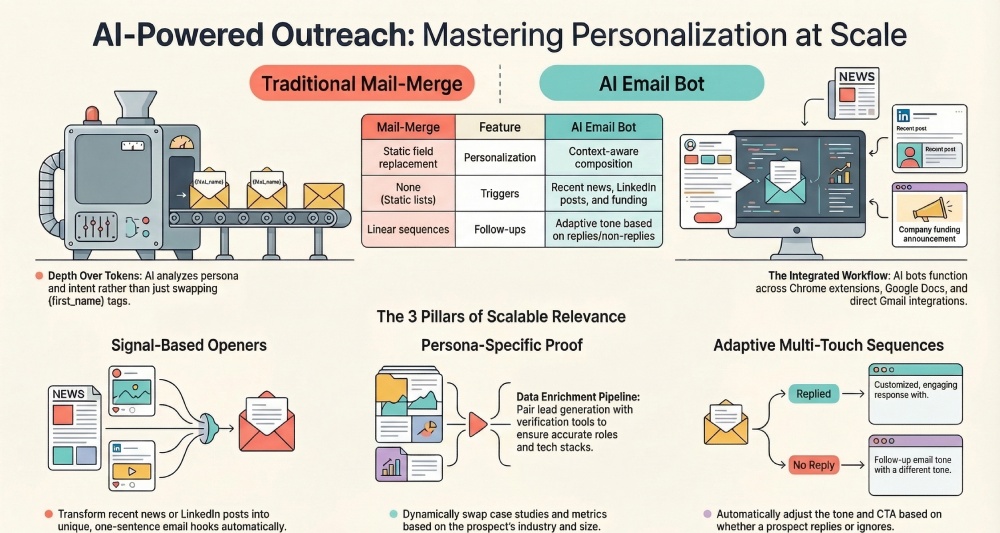
A cold email AI bot is an AI email writing assistant embedded in your workflow—via a Chrome extension, a web-based version, or direct Gmail integration—that uses AI-assisted composition to generate and refine personalized outreach messages. Unlike mail-merge that drops the same boilerplate into static fields, anAI email tool ingests context (persona, industry, intent, funding, tech stack, and recent signals) and outputs AI-generated emails tailored to a prospect’s needs. The result is higher-quality email outreach that respects message structure, reduces grammar mistakes with built-in spell checking, and streamlines email automation across sales teams.
A basic overview of the tool landscape
- Smart Copy (formerly Snazzy.ai by Unbounce) offers a template library and Brainstorm Mode for content creation, including cold email templates and Thank You messages, with a Free Forever tier and a credit system.
- Compose.ai and Flowrite provide Chrome extensions with Gmail integration and Google Docs add-ons, making it easy to draft a first outreach email inside Gmail, then move longer drafts to Google Docs for content editing, list formatting, and bullet points. Compose.ai premium unlocks advanced outputs and reduces feature limitations.
- Woodpecker focuses on cold outreach delivery and email verification, complementing AI-assisted composition by ensuring valid addresses before you scale an outreach campaign.
Why personalization outperforms mail-merge
- Depth over tokens: Mail-merge fills {first_name} and {company}; personalization steers AI-assisted composition to include role-specific pains, recent news, and value propositions that map to prospect focus.
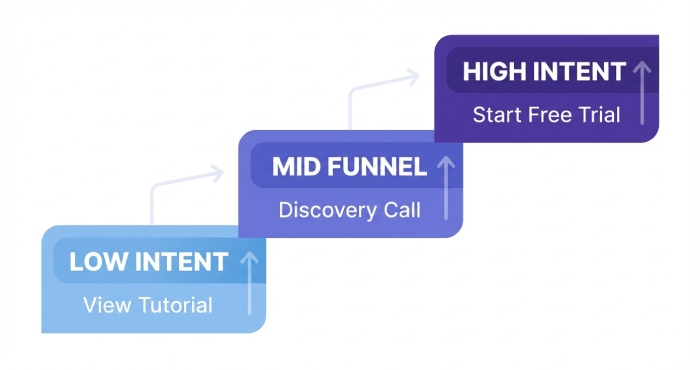
- Dynamic intent: AI input prompts can adapt the email subject line, call to action, and follow-up plan to the funnel stage—e.g., a discovery call CTA for mid-funnel or a free trial invite for product-qualified leads.
- Operational excellence: With a familiar user interface in Gmail, a Chrome extension, and Google Docs for collaboration, sales managers can codify sales training and a training course’s best practices into reusable email templates that protect output quality at scale.
Where integrations matter
- Chrome extension: Capture LinkedIn insights in one click and trigger AI-assisted composition on the page.
- Gmail integration: Draft, insert, and send without losing context; run an email preview and check message formatting.
- Google Docs: Centralize editing requirements, collaborate with sales teams, and store approved email templates.
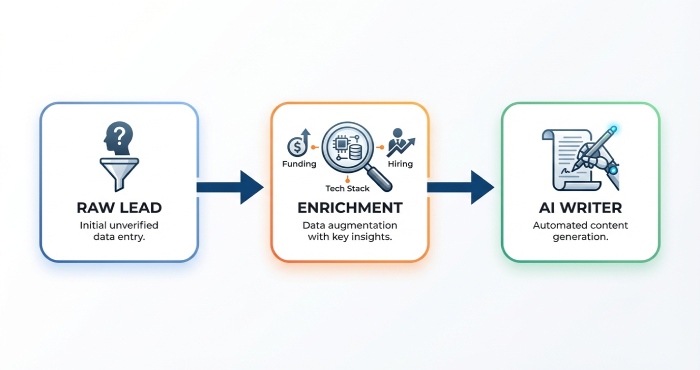
Way 1: Enrich and verify leads to power accurate dynamic fields (role, tech stack, funding, triggers)
Build a reliable enrichment and verification pipeline
Your cold email depends on accurate data. Pair a lead generation workflow with enrichment (role, seniority, tech stack, HQ, latest VC round) and email verification. Woodpecker and similar tools help automate email verification to keep bounce rates low and improve response rate. Feed verified data to your AI email tool so AI-assisted composition can reference the right dynamic fields.
Practical steps
- Use a Chrome extension to capture profile details during email prospecting and sales prospecting.
- Enrich companies for recent funding (VC and Angel investor signals), hiring, and product updates—context your AI email writing assistant can turn into credible openers.
- Store the enriched records in Google Docs or your CRM, then sync to your AI email tool with clear input prompts that define persona, problem, and trigger.
Field mapping that drives personalization
- Role and team: “sales managers” vs “RevOps” vs “Founders.”
- Tech stack: “Sales engagement + CRM” vs “Marketing automation.”
- Funding and triggers: “Series A VC announcement” or “new Angel investor board member.”
Guardrails for output quality
Create an approval path: first outreach email drafts in Google Docs, a quick email preview, and standardized editing requirements for tone, message structure, and list formatting. Establish a checklist to prevent grammar mistakes and ensure spell checking passes. This keeps outputs on-brand before they move into email automation.
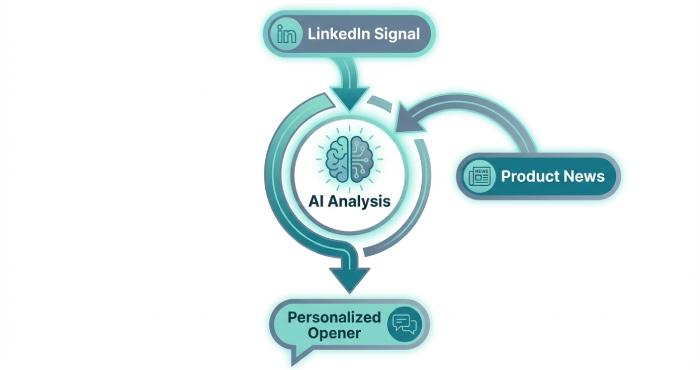
Way 2: Auto-generate hyper-relevant first lines using recent signals (news, LinkedIn posts, product updates)
Turn signals into personalized openers
Recent news, a CEO’s LinkedIn post, or product changelogs are gold for cold outreach. Use your AI email writing assistant in Brainstorm Mode to summarize and transform each signal into a one-sentence hook. In Compose.ai or Flowrite, open the Chrome extension while viewing the source, capture a snippet, and prompt the AI email tool to draft three openers—then paste the best into your email outreach.
Repeatable prompt pattern
- Input prompts: “Summarize this LinkedIn post in one sentence; relate it to reducing SDR ramp time; keep it under 22 words.”
- Outputs: Three variations that reference the post specifically, connect to lead generation outcomes, and set up a discovery call.
- Quality controls: Run an email preview, confirm message formatting in Gmail, and store strong lines in a Google Docs swipe file.
Tool-specific accelerators
- Compose.ai: The extension plus Gmail integration makes it fast to generate contextual first lines inline. Compose.ai premium adds longer context windows and fewer feature limitations.
- Smart Copy by Unbounce: Use the web-based version for content creation sprints; pull ideas from its template library and Free Forever plan; escalate to premium upgrade if you exceed the credit system.
- Flowrite: Templatize your opener framework and apply it consistently, reducing manual content editing.
Use cases beyond sales
- VC pitch emails: Reference a firm’s latest fund thesis or portfolio news.
- Angel investor emails: Cite an investor’s recent talk, then connect your traction to their interest area.
- Post-meeting Thank You messages: Auto-generate recaps and next steps after a discovery call.
Way 3: Segment by persona and pain, then tailor value propositions and objections per segment
Build persona-specific email templates
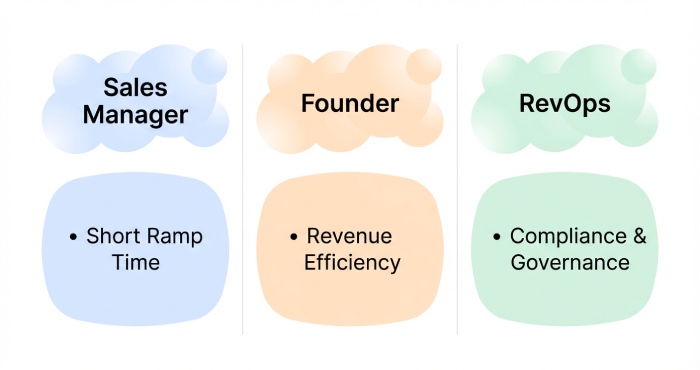
Segmenting by persona and pain ensures personalization without rewriting from scratch. Create email templates for sales managers, product leaders, founders, and operations teams. Your AI-assisted composition can inject objections, benefits, explanation, and proof in a persona’s language.
Example segments and angles
- Sales managers: Emphasize shorter ramp via sales training assets, improved response rate, and cleaner follow-up workflows.
- Founders/VC: Tie outcomes to revenue efficiency; reference VC or Angel investor milestones if relevant.
- Ops/Enablement: Focus on governance, user interface familiarity, and Gmail integration rollouts.
Encode objections and CTAs per segment
- Objections: “We already have templates,” “We worry about output quality,” or “We need compliance.” Use the AI email writing assistant to generate bullet points addressing each.
- CTAs: For top-of-funnel, a short discovery call; for product-qualified leads, a free trial; for compliance-minded ops, a tutorial video or a basic overview deck.
Process to operationalize
- Draft in Google Docs for collaborative content editing and list formatting.
- Standardize message structure: personalized opener, pain, tailored value, proof, call to action.
- Document sales training snippets (from your training course) as reusable prompts, so cold email outputs reflect consistent sales methodology and prospect focus.
Way 4: Personalize subject lines and CTAs to prospect intent, funnel stage, and risk tolerance
Subject lines that signal relevance
Use your AI email tool to generate 5–7 variations of an email subject line aligned to intent and funnel stage:
- Intent-signal: “Hiring 3 SDRs?” for sales teams scaling headcount.
- Trigger-based: “Congrats on your Series B—here’s how teams protect reply rates.”
- Risk-calibrated: Low-commitment “2-min idea?” vs higher-commitment “15-min discovery call next week?”
Run quick A/B tests inside your outreach campaign; store winners in your template library; and keep a Gmail integration workflow to preview truncation and avoid spammy phrasing.
CTA ladders that match comfort levels
- No-pressure: “Can I send a 90-second tutorial video?”
- Mid-funnel: “Open to a 10-minute discovery call to show how peers lifted response rate 22%?”
- Bottom-funnel: “Spin up a free trial—our Chrome extension and Gmail integration will auto-import templates; Google Docs holds the playbook.”
Follow-up logic and tone
- First outreach email: Personalized opener + one pain + one proof + a single call to action.
- Follow-up: Rotate value props, include brief benefits explanation, and add social proof. Use Thank You messages after meetings to reinforce next steps and avoid over-selling.
- Compliance and clarity: Keep message formatting clean, avoid jargon, and ensure spell checking passes.
Practical checkpoints before sending
- Email preview in Gmail to confirm spacing, list formatting, and bullet points render well.
- Confirm email verification on any net-new contacts.
- Review outputs in Google Docs for editing requirements and to align sender’s needs with the prospect’s needs.
Bringing it together with tooling
- AI email writing assistant + AI-assisted composition: Generate personalized cold email at scale without sacrificing nuance.
- Chrome extension + Gmail integration + Google Docs: Capture signals, compose in inbox, and centralize governance.
- Sales training baked in: Encode your training course frameworks so every discovery call ask lands consistently, and sales managers can audit message structure.
By combining enrichment, signal-based openers, persona-level segmentation, and intent-aware subject lines and CTAs, companies move from generic cold outreach to precision email outreach. The outcome: better lead generation,more qualified discovery calls, and a system that scales with your tools—whether Smart Copy, Compose.ai, Flowrite, or Woodpecker—across Free Forever tiers, free trials, or premium upgrades.

Way 5: Build adaptive multi-touch sequences that adjust tone and content to replies and non-replies
Map the journey across replies, non-replies, and soft signals
- Use your AI email writing assistant to plan every touch across an outreach campaign: first outreach email, follow-up nudges, bump replies, and final Thank You messages.
- Trigger branches based on explicit replies, auto-replies, and implicit signals (opens, clicks, time-on email preview) captured by your email automation stack.
Timing windows and safe throttling
- Calibrate delays (e.g., 2, 5, 9 days) to preserve sender reputation and improve response rate.
- Pause sequences on any reply, and resume only after manual review to keep prospect focus aligned with the prospect’s needs.
Channel mix and fallback
- If Gmail integration flags a send error or your email verification fails, route to a LinkedIn note or a different domain.
- When deliverability dips, switch to a lighter touch: plain-text cold email with shorter message structure.
Adjust tone and intent with AI-assisted composition
- For positive replies, pivot the tone from value-proving to logistics—offer a clear call to action to book a discovery call.
- For non-replies, your AI email tool can soften or sharpen tone based on persona: more consultative for executives, crisper for technical buyers.
Personalization layers and dynamic snippets
- Blend account-level personalization with role-based pain points using email templates that pull CRM fields.
- Leverage AI-assisted composition to rewrite openers from generic claims into context-rich lines tied to the sender’s needs and the prospect’s needs.
Orchestrate intent-specific messaging at each touch
- Touch 1: Problem-framing first outreach email with a concise email subject line and a single, low-friction ask.
- Touch 2–3: Objection-handling, case-study mention, and a softer discovery call prompt.
- Touch 4+: Breakup note, resource share, or a final Thank You message that invites future contact.
Safeguards for empathy and compliance
- Gate edgy humor or urgency through content editing checks to prevent grammar mistakes, off-brand slang, or risky claims.
- Use message formatting presets to keep list formatting, bullet points, and paragraph density consistent across sends.
Edge case: OOO and “not the right person”
- Auto-detect OOO and reschedule.
- If redirected, your AI email tool rewrites for the new prospect, preserving email personalization without repeating earlier claims.
Way 6: Swap in the most resonant social proof, case studies, and metrics by industry and company size
Build a segmentation taxonomy your AI can understand
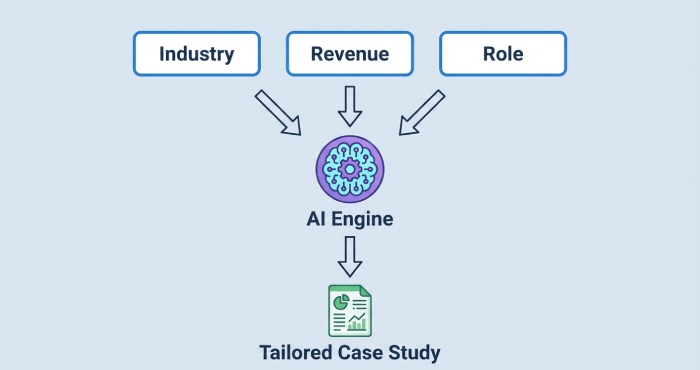
- Define segments by industry, revenue band, employee count, and sales maturity so AI-generated emails surface the right proof.
- Tag assets in your template library with sector, problem, and KPI focus to speed content creation during email prospecting.
Proof-matching logic and safe claims
- Use input prompts like “Healthcare, 500–1,000 FTE, reduce SDR ramp” to guide outputs that cite relevant metrics.
- Lock compliance-approved ranges (e.g., “20–35% lift”) to avoid overpromising and protect output quality.
Auto-insert social proof across touches
- Early touch: one-liner credibility anchored to well-known companies.
- Mid-sequence: 2–3 bullet points with quant metrics and a light benefits explanation before the call to action.
Case study cards and micro-summaries
- Program your AI email writing assistant to synthesize one-paragraph case study cards with customer role, problem, action, result, and discovery call trigger.
- Include alternate angles for VC pitch emails and Angel investor emails when the outreach campaign targets fundraising stakeholders.
Tooling examples that help operationalize proof
- Smart Copy by Unbounce (formerly Snazzy.ai) can draft variations quickly; Flowrite and Compose.ai streamline short-form proof blurbs inside Gmail via Chrome extension.
- Woodpecker slots social proof into sequences automatically; Compose.ai premium and Free Forever tiers both integrate with Google Docs for longer case snippets.
Governance over metrics usage
- Store proof claims in Google Docs and sync to the AI email tool; allow sales managers to approve updates.
- Version by region to align with local compliance and maintain message structure consistency.
Way 7: Localize tone, style, and compliance (GDPR/CAN-SPAM) by region and buyer culture
Layer localization onto every cold outreach touch
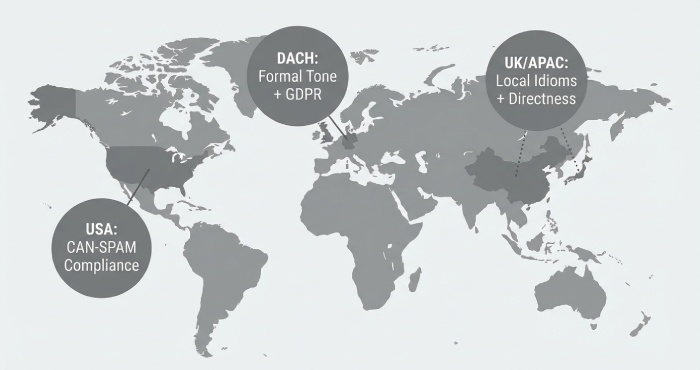
- Localize spelling, idioms, and levels of directness using AI-assisted composition presets for UK, DACH, Nordics, and APAC.
- Adapt the call to action: some cultures prefer a short discovery call request; others favor an initial resource share.
Compliance-first scaffolding
- Append region-specific footers for GDPR and CAN-SPAM and honor data subject rights with clear unsubscribe links.
- Automate email verification and suppression of non-opt-in lists to protect deliverability and brand.
Style calibrations by buyer persona
- Finance and VC audiences often expect crisp, numbers-forward cold email copy; technical buyers want links to docs and outcomes.
- Angel investor or VC audiences may favor concise proofs and scheduling clarity; sales teams want enablement and sales training resources.
Localization QA and native review
- Route drafts through a native reviewer via the AI email tool’s approvals to catch idiomatic slips and grammar mistakes.
- Use spell checking and content editing checklists tuned to local conventions, then run an email preview with live Gmail integration.
Workflow and guardrails: Connecting CRM/enrichment to your cold email AI bot with prompts, approvals, and QA
Data plumbing: CRM, enrichment, and triggers
- Sync firmographics, technographics, and recent events into your AI email writing assistant to drive precise personalization.
- Use web-based version and Chrome extension workflows so reps can draft inside Gmail or Google Docs with the same data context.
Prompt engineering for consistent outputs
- Standardize input prompts: “Persona + trigger + asset + CTA + disqualification criteria” to reduce variance.
- Embed sales training cues in prompts so AI-generated emails reflect your training course language.
Human-in-the-loop approvals and safety rails
- Require approvals for high-stakes sequences (e.g., executive outreach campaign, regulated industries).
- QA checklists: message formatting, list formatting, link hygiene, and feature limitations disclosures where relevant.
UI and experience considerations
- Choose an AI email tool with a clean user interface, email preview, and clear credit system so new reps adopt it as a productivity tool.
- Provide a tutorial video and a basic overview doc that covers editing requirements, output quality expectations, and when to escalate.
Multi-surface authoring and extensions
- Draft long-form narratives in Google Docs, then condense with Brainstorm Mode for concise cold email variations.
- Use the extension inside Gmail for quick follow-up edits, and rely on Compose.ai, Flowrite, or Nureply to accelerate micro-personalization, helping sales teams quickly tailor messages with relevant context while maintaining speed and consistency in cold email outreach
Governance, pricing, and upgrades
- Document feature limitations and when a premium upgrade (e.g., Compose.ai premium) is justified.
- Track Free Forever usage across companies to prevent over-reliance and ensure sustained lead generation performance.
Measurement and iteration: A/B tests, deliverability hygiene, and KPIs to scale what works
A/B testing that respects deliverability
- Test one variable at a time: email subject line, opener, proof block, or call to action for discovery call booking.
- Rotate sending identities, maintain email verification, and stagger sends to avoid spam traps during cold outreach.
Deliverability hygiene and infrastructure
- Warm domains, authenticate (SPF/DKIM/DMARC), and monitor bounce rates; throttle email automation if metrics drift.
- Keep copy plain-text leaning; your AI-assisted composition can format for clarity without heavy images.
KPI dashboards and learning loops
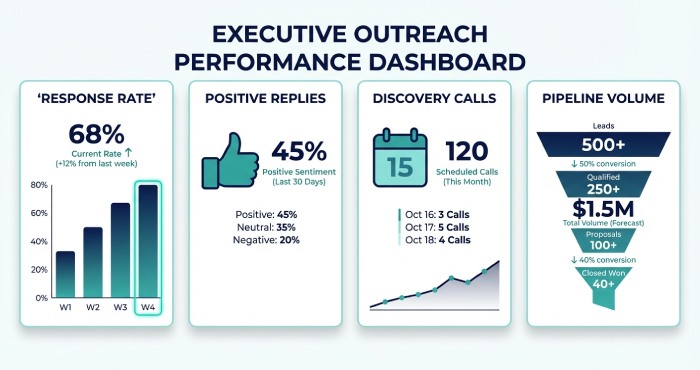
- Track response rate, positive reply rate, booked discovery call rate, and pipeline per 100 prospects.
- Feed outcomes back into the AI email writing assistant so future email templates emphasize winning angles.
Iteration cadence with sales managers
- Weekly reviews with sales managers and sales teams to refine prompts, swap proof assets, and tune personalization depth.
- Integrate insights into a sales training refresh and a short training course module for ongoing enablement.
Closing the loop with coaching and assets
- Turn top-performing outputs into reusable email templates across personas.
- Share a benefits explanation cheat sheet and bullet points that reps can paste via Chrome extension during content creation.
Bringing it all together across surfaces
- From the Gmail integration to the Google Docs drafting flow, make it seamless for reps to move from ideation to send.
- Standardize follow-up logic so the AI email tool adapts tone based on reply sentiment and continues to drive lead generation.

FAQs
How do adaptive sequences improve cold email performance?
Adaptive multi-touch sequences adjust tone and content based on replies and non-replies, ensuring each message reflects the prospect’s needs and stage. This increases relevance, boosts response rate, and accelerates discovery call bookings.
What tools help with personalization at scale?
An AI email writing assistant with Gmail integration, a Chrome extension, and Google Docs support enables fast, accurate personalization. Tools like Compose.ai, Flowrite, Smart Copy by Unbounce, and Woodpecker streamline insertion of social proof and manage email automation.
How should I handle GDPR and CAN-SPAM in cold outreach?
Localize compliance footers, include clear unsubscribe options, and respect data rights by suppressing non-opt-in contacts. Pair this with email verification and careful list hygiene to maintain deliverability.
What KPIs should sales managers track?
Monitor response rate, positive replies, discovery call conversions, and pipeline per 100 prospects. Review these weekly to refine email templates, prompts, and social proof usage.
How do I ensure output quality from AI-generated emails?
Provide precise input prompts, enforce content editing checklists, and use spell checking and message formatting standards. Add human approvals for high-stakes sends and review email preview before launch.
Can these workflows support investor outreach?
Yes. Your AI email tool can generate VC pitch emails and Angel investor emails with tailored proof and concise CTAs. Use industry-specific metrics and keep the message structure direct and number-forward.
Do I need a premium upgrade to get results?
Start with Free Forever tiers to validate fit, then consider a premium upgrade like Compose.ai premium for advanced features or higher limits. Ensure the credit system and feature limitations align with your team’s volume.
Key Takeaways
- Use adaptive, AI-assisted composition to tailor every cold email touch to replies and non-replies, always steering toward a discovery call.
- Centralize social proof and case studies, then programmatically insert the most relevant metrics by industry and company size.
- Localize tone and compliance rigorously, pairing GDPR/CAN-SPAM controls with regional style preferences.
- Connect customer realtionship management(CRM) and enrichment to your AI email writing assistant, standardize prompts, and enforce approvals and QA.
- Measure relentlessly with A/B tests and deliverability hygiene, then scale winning email templates via Gmail integration, Chrome extension, and Google Docs workflows.