

From Generator To CRM: Integrating A Cold Email AI Tool Into Your Sales Stack
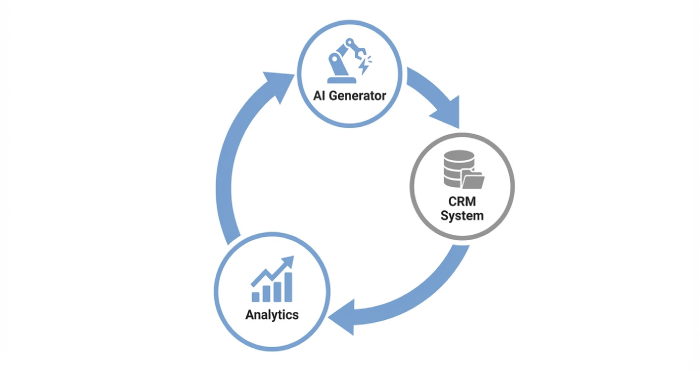
Integrating a cold email AI tool into your sales stack isn’t just about automating outreach—it’s about transforming how your entire revenue engine operates. Think of it as moving from a standalone generator that produces messages to a fully connected ecosystem where every email, response, and interaction feeds directly into your CRM. Instead of juggling disconnected tools and manual data entry, your AI-powered cold email generator works in sync with your customer relationship management system, enriching lead profiles, triggering follow-ups, and giving your sales team real-time visibility into engagement.
The result? Smarter prospecting, cleaner pipelines, and more predictable growth. In today’s competitive landscape, connecting your generator to your CRM isn’t a technical upgrade—it’s a strategic shift that turns cold outreach into a scalable, data-driven sales machine.
Why add an AI cold email generator to your sales stack: goals, use cases, and fit
Outcomes to target
- Expand predictable lead generation: Use a cold email AI tool to scale email outreach without sacrificing relevance. Tie activity to opportunity tracking, conversion tracking, and pipeline analytics so email becomes a measurable lever in your sales pipeline.
- Improve sales engagement quality: An AI email writing assistant can refine email copy, enforce tone, and maintain consistent personalization across sequences, lifting reply rates while keeping compliance guardrails.
- Accelerate business growth: Pair automated email with human-led discovery call motions so reps spend time on buying signals, not first drafts. Add follow-up automation and reply management to push prospects toward meetings.
Core use cases
- Top-of-funnel outreach campaign creation: Generate first-touch and nurture sequences with AI prompts, AI Spintax, and personalization variables that adapt to each prospect’s context and your target audience segments.
- SDR enablement and SOPs: Standardize email templates, A/Z testing plans, and response categorization so teams follow repeatable SOPs that drive campaign performance.
- Integrated sales engagement: Orchestrate email automation with calling, LinkedIn touches, and Unibox-style unified inbox workflows that coordinate multiple email accounts while protecting sender reputation.
Fit considerations
- Volume and complexity: If you run bulk email sending across multiple markets, you need email management, email account rotation, and email account scaling features to preserve email deliverability.
- Team collaboration: Look for an outreach solution that supports role-based permissions, template library governance, and shared playbooks (e.g., a sales vault or Sales Vault-style workspace).
- Stack alignment: Ensure seamless handoff to CRM for opportunity tracking and revenue optimization, with clean data syncing from sequence to deal stage.
Choosing the right tool: model quality, data privacy, compliance, and native integrations
Model and workflow quality
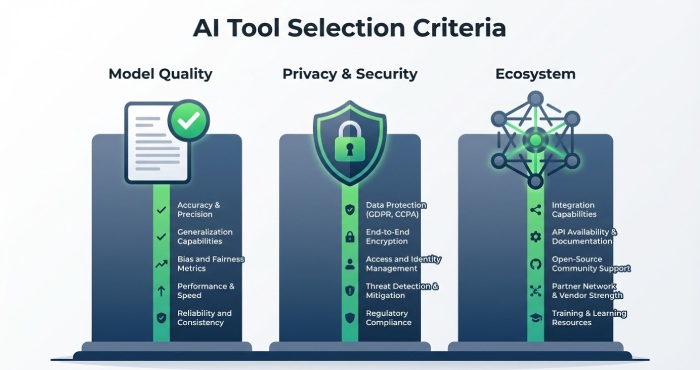
- Evaluate the AI tool’s writing engine (e.g., Smart Copy by Unbounce, formerly Snazzy.ai) for factual grounding, controllable tone, and reliable content generation. A strong AI content writer should power both short-form email content and multi-step sequences.
- Test the AI email writing assistant on real email templates and prompts. Check whether AI optimization can vary messages using AI Spintax while maintaining message-market fit.
Privacy, security, and compliance
- Confirm data residency, SOC2/ISO controls, and PII handling, especially when ingesting lead intelligence and enrichment data. Built-in AI spam checker and Spam Word Checker capabilities help reduce risky phrasing before send.
- Verify that the provider supports CAN-SPAM/GDPR requirements out of the box, including consent flags, suppression logic, out-of-office responder handling, and unsubscribe management.
Native integrations and ecosystem
- Seek native syncs with CRMs and tools such as Instantly.ai, Woodpecker, and Unibox for reply management. Pair with email verification services (e.g., Emaily Zone) and warmup utilities to bolster sender reputation.
- Confirm connectors to enrichment sources and marketing platforms. Check user interface quality, feature updates cadence, and availability of training courses and a free trial for hands-on validation.
Real-world operator signals
Leaders like Raul Kaevand (Instantly.ai), and practitioners across agencies such as Canbury Partners, Thincture, Brand Digitizer, and PDMacro emphasize choosing platforms that sustain email outreach at scale without compromising email deliverability. Experienced operators—Sam Wilson, Sanjay John Eapen, Tony Liu, Shivang Singh, David Taggart, Tasha Roachford, and Michael Cooper—often index on integration depth, robust reply parsing, and clear analytics over flashy demos.
Data foundations: ICP definition, list building, enrichment, and clean data pipelines
ICP and segmentation
- Precisely define ICP tiers and negative segments. Align personalization variables to each segment: role, industry, tech stack, trigger events, and buying signals.
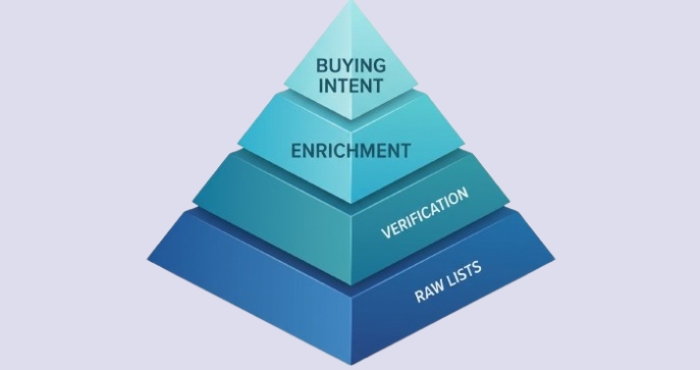
- Pair lead generation with lead intelligence by capturing firmographics, technographics, and intent. Use this to prioritize the outbound pipeline and hand-raisers for faster discovery call scheduling.
List building and enrichment
- Build lists from high-quality sources, then run lead enrichment to append titles, social proofs, and recent news. Map fields cleanly for dynamic tags in email templates.
- Standardize data formatting and validation in your pipeline so personalization doesn’t break. Document SOPs for how SDRs add or correct records.
Clean pipelines and analytics
- Implement email verification pre-send to cut bounces and protect sender reputation. Combine with email warmup to establish healthy domain signals.
- Instrument conversion tracking and pipeline analytics to connect email automation outputs to opportunity creation and campaign optimization. Use dashboards to monitor campaign performance by segment and channel.
Personalization at scale: prompts, templates, dynamic fields, and tone governance
Prompting and template strategy
- Build a prompt library with approved AI prompts that encode ICP, value props, and objection handling. Your AI tool should support guardrails and reusable blocks.
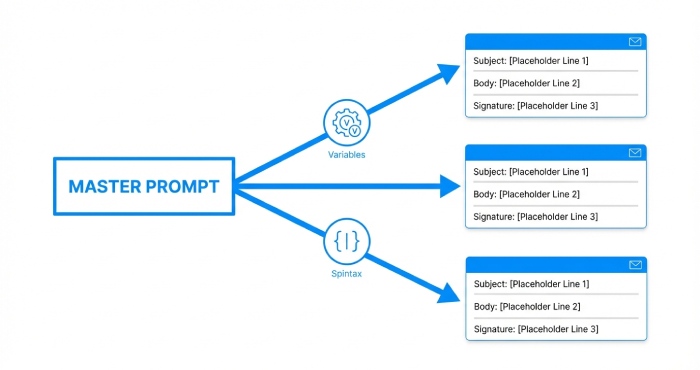
- Maintain a template library for first-touch, bump, breakup, and post-demo follow-ups. Use AI Spintax to create natural variation across automated email steps without losing message control.
Dynamic fields and tone control
- Use personalization variables and conditional logic to adapt openings, proof points, and CTAs. Enforce tone governance with the AI email writing assistant so email copy stays on-brand and compliant.
- Run A/Z testing across subject lines, offers, and lengths. Feed results back into AI optimization routines for continuous campaign optimization.
Workflow and inbox operations
- Centralize reply management in Unibox or comparable systems. Automate response categorization (OOO, referral, not interested, book-a-call) and route to the right owner.
- Configure an out-of-office responder workflow to capture alternates and re-engage automatically when the prospect returns. Align with follow-up automation so no response is wasted.
Quality controls
- Preflight drafts with an AI spam checker and a Spam Word Checker to minimize risk while preserving persuasive language. Validate links, signatures, and footer compliance.
- Layer human review for key accounts while relying on automated email for lower-tier segments. The blend increases sales engagement while protecting brand integrity.

Deliverability first: domains, warm-up, verification, sending infrastructure, and CAN-SPAM/GDPR
Domain and infrastructure hygiene
- Use separate sending domains for cold email, authenticated with SPF, DKIM, and DMARC. Distribute volume across multiple email accounts to diversify signals and avoid blocklisting.
- Implement email account rotation and pacing rules. Limit bulk email sending per inbox and use gradual email account scaling to maintain a natural send pattern.
Warmup, verification, and sending practices
- Set up email warmup before full-scale campaigns, then keep a baseline trickle to sustain positive indicators. Tools like Instantly.ai and Woodpecker provide warmup and sending heuristics that protect sender reputation.
- Run continuous email verification using services like Emaily Zone to minimize invalids and hard bounces. Pair with suppression lists and role-account filtering to improve email deliverability.
Content and cadence safeguards
- Use AI Spintax and template variants to reduce footprint similarity while staying on-message. Keep body copy concise, text-to-link ratios healthy, and avoid heavy imagery in cold email.
- Scan drafts with an AI spam checker to catch risky phrasing; iterate with your AI email writing assistant to balance persuasion and compliance. Maintain consistent personalization without overfitting—natural variability beats gimmicks.
Compliance and governance
- Enforce opt-out mechanisms, company address, and lawful sender identity in every automated email. Log consent and suppression in your CRM for auditability under CAN-SPAM/GDPR.
- Align cadence caps, quiet hours, and regional rules in your outreach campaign settings. Document processes in SOPs so team collaboration stays compliant as you scale.
Measurement and iteration
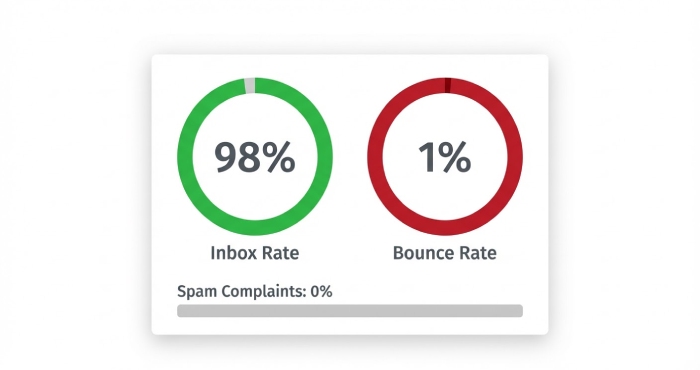
- Tie deliverability metrics (inbox rate, bounce rate, spam flags) to downstream outcomes in conversion tracking and pipeline analytics. Poor deliverability erodes sales engagement and masks true campaign performance.
- Use an outreach solution with granular dashboards and alerting. Prioritize feature updates that improve user interface clarity, add reply parsing, and expand integrations. Validate roadmap fit during a free trial and, if needed, a vendor-led discovery call.
Integration patterns: connecting the AI tool with CRM/SEP via native apps, APIs, and middleware
Native app integrations
CRM connectors and SEP bridges
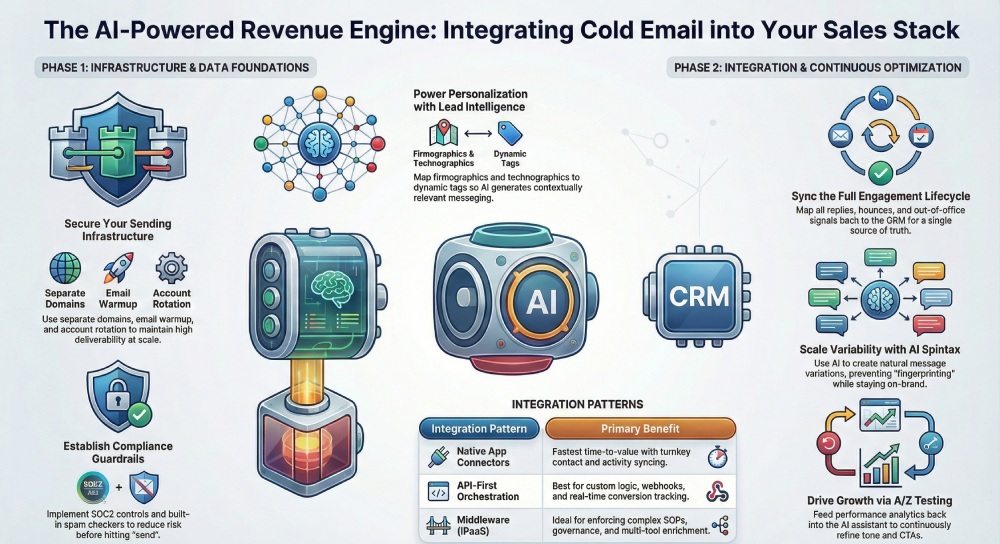
The fastest path to value is a native connector between your AI tool and your CRM/SEP stack. Platforms like Instantly.ai, Woodpecker, and Unibox provide turnkey syncs for contacts, sequences, and sales engagement activities, ensuring cold email and email outreach data flows without friction. Native apps often bundle email verification, email warmup, and automated email scheduling to protect sender reputation and maximize email deliverability from day one.
Data flow for outreach and engagement
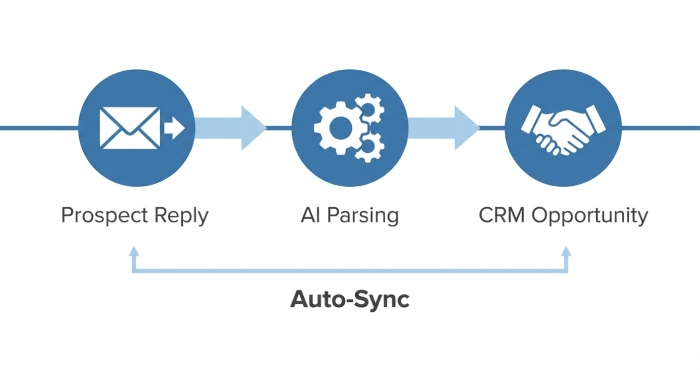
Design the flow so the AI email writing assistant generates email copy and AI Spintax at the campaign level, while the CRM owns lead generation, lead intelligence, and opportunity tracking. Sync reply management, response categorization, and out-of-office responder signals back to the SEP to drive follow-up automation and campaign optimization. This preserves a single source of truth for the sales pipeline and improves downstream pipeline analytics.
API-first orchestration
Webhooks and events for analytics
An API-first approach lets you push events—opens, clicks, replies, bounces—into your CRM for conversion tracking and pipeline analytics. Use webhooks to stream buying signals and lead enrichment outcomes to the AI tool, enabling dynamic personalization and AI optimization for each prospect. This real-time feedback loop enhances campaign performance and revenue optimization across the outbound pipeline.
Auth, throughput, and account strategy
Harden OAuth flows, apply rate limits, and architect multiple email accounts with email account rotation to safeguard sender reputation during bulk email sending. For scale, implement email account scaling across domains, and centralize email management in Unibox or a similar user interface. Tie email automation schedules to deliverability guardrails—throttling automated email when spam risk rises.
Middleware and iPaaS
ETL, enrichment, and prompts
When native apps are missing, middleware (iPaaS/ETL) can map objects and pass AI prompts for content generation. Enrich records with firmographics, technographics, and intent to fuel lead intelligence and personalization variables, then feed this context to the AI email writing assistant. This ensures email content quality while keeping the outreach campaign aligned to the target audience.
Governance layers
Middleware can enforce SOPs for approvals, apply a Spam Word Checker or AI spam checker, and log all automation. It also standardizes email templates, AI Spintax variations, and A/Z testing plans, improving auditability and brand safety across sales engagement workflows.
Field mapping and workflows: syncing contacts, activities, sequences, and deal stages in the CRM
Object model alignment
Contacts and accounts
Define canonical fields for contacts, accounts, and prospect records. Map personalization variables—role, pain points, industry—so the AI tool can compose cold email variants and tailored email copy using approved email templates from a template library. Align lead generation sources and lead enrichment attributes to maintain consistent segmentation.
Activities and replies
Mirror activities for automated email sends, follow-up automation, and manual touches. Capture reply management outcomes, response categorization (positive, nurture, not a fit), and out-of-office responder tags to drive rescheduling and campaign optimization. Log email verification checks and bounce types to improve email deliverability.
Sequence and pipeline sync
Sequences, SOPs, and pipeline
Sync sequence enrollment, step outcomes, and pauses back to the CRM to preserve the sales pipeline view. Tie SOPs to stage movements—e.g., positive replies create a task and a discovery call, while high-intent signals create an opportunity with opportunity tracking enabled. Connect to a sales vault or the Sales Vault entity for battlecards and messaging.
Deal stages and handoffs
When replies cross a quality threshold (using lead intelligence and buying signals), auto-create deals at the correct stage. Maintain audit fields for AI tool-generated content, ensuring human review gates before stage progression.
Deliverability and compliance data
Verification, warmup, and reputation
Sync email verification status, domain health, and email warmup progress from Nureply directly to the CRM to maintain full visibility across your outreach infrastructure. Track sender reputation trends per domain and per mailbox, and gate email automation volume accordingly to prevent deliverability risks before they escalate.
These data points, when centralized and continuously updated, inform campaign performance diagnostics, support smarter scaling decisions, and protect long-term email outreach capacity while ensuring your sales stack operates on clean, reputation-safe data.

Measurement and optimization: A/B testing, attribution, dashboards, and feedback loops to the model
Testing frameworks
Test design for scale
Run A/B testing for lines and offers, and extend to A/Z testing at volume using AI Spintax to explore message space safely. Combine subject line experiments with personalization depth (light vs rich) and cadence timing to drive campaign optimization. Feed wins back into the AI email writing assistant for AI optimization across future sequences.
Attribution and analytics
Dashboards and revenue linkage
Build dashboards that connect reply quality to pipeline analytics, revenue optimization, and business growth. Attribute outcomes to channels, sequences, and AI prompts to understand what drives cold email conversions. Track campaign performance by persona and industry to sharpen target audience fit.
Feedback loops to the models
Pipe performance data into the AI content writer and AI email writing assistant to refine tone, brevity, and call-to-action. Automate pre-send checks with an AI spam checker and Spam Word Checker to reduce risk. Iterate email content and templates weekly based on conversion tracking and downstream deal velocity.
Content quality and generation
Copy systems and tools
Standardize email copy patterns—hook, value, proof, CTA—and let tools like Smart Copy by Unbounce or Snazzy.ai propose drafts while your AI tool finalizes AI Spintax and personalization. Maintain a curated template library, and ensure content generation follows style guides and compliance requirements. Align messaging with lead intelligence to resonate with the target audience.
Personalization that scales
Blend firmographic and trigger-based personalization with variable-driven inserts. Use AI Spintax to diversify phrasing without diluting meaning, and lock critical claims to avoid drift. This balance maintains sender reputation and strengthens email deliverability despite scale.
Team enablement and process: roles, playbooks, review gates, and QA to prevent brand risk
Roles and responsibilities
Operating model
SDRs run day-to-day email outreach and reply management; AEs handle discovery call follow-through; RevOps governs data quality and email management. Content leads approve messaging, while compliance sets guardrails for automated email and bulk email sending. Cross-functional team collaboration ensures sales engagement and lead generation stay aligned.
Playbooks and SOPs
Quality assurance
Implement SOPs for message QA: intent match, clarity, claims, and compliance. Enforce review gates for new sequences using the Spam Word Checker, AI spam checker, and deliverability checks. Require sign-off on personalization variables, AI prompts, and high-volume outreach campaign plans.
Training and change management
Adoption at pace
Roll out training courses on the user interface, feature updates, and best-practice email automation. Offer a free trial environment for reps to practice with multiple email accounts, email account scaling, and email account rotation strategies. Document escalation paths for anomalies and keep a change log for governance.
Security, legal, and risk management: data handling, permissioning, SOC 2, DPAs, and human-in-the-loop guardrails
Data governance
Handling and permissions
Classify data by sensitivity and bind processors with DPAs. Enforce least-privilege permissioning for the AI tool, CRM, and SEP, and keep a human-in-the-loop for high-risk sends or sensitive industries. Retain encryption in transit and at rest, with clear retention and deletion timelines.
Technical controls
Certifications and access
Prioritize vendors with SOC 2 Type II or equivalent attestations. Apply SSO, MFA, role-based access, and audit logging for every send and edit. Control throughput for automated email to preserve email deliverability and sender reputation across domains and mailboxes.
Deliverability risk mitigation
Volume, rotation, and pacing
Throttle email automation by mailbox health, use email account rotation to spread risk, and warm new domains gradually. Limit bulk email sending bursts, tie cadences to engagement windows, and pause sequences when negative signals spike. Continually validate lists with email verification to minimize bounces.

Ecosystem examples and endorsements
Vendors and practitioners
Tools and platforms
Operational leaders often pair Instantly.ai for scale with Woodpecker for granular sales engagement, while Unibox centralizes inboxes for streamlined reply management. Operators reference Emaily Zone for deliverability insights and Sales Vault for enablement collateral.
Agencies and brands
Agencies such as Canbury Partners, Thincture, Brand Digitizer, and PDMacro emphasize lead intelligence, lead enrichment, and compliant cold email at scale. Their playbooks blend email verification, AI Spintax, and campaign optimization to accelerate opportunity creation.
Practitioner voices
Leaders including Sam Wilson, Sanjay John Eapen, Tony Liu, Shivang Singh, David Taggart, Tasha Roachford, Michael Cooper, and Raul Kaevand frequently highlight how disciplined email outreach, rigorous A/B testing, and strong sender reputation compound pipeline outcomes.
FAQs
How should I choose between native integrations, APIs, or middleware?
Use native apps for speed and maintenance simplicity, APIs for custom logic and conversion tracking, and middleware to enforce SOPs and governance. Many programs blend all three for resilience and scale.
What’s the best way to protect email deliverability at scale?
Continuously validate lists with email verification, warm domains gradually, and rotate multiple email accounts. Monitor sender reputation and throttle email automation and bulk email sending when risk increases.
How do A/B testing and A/Z testing differ in practice?
A/B testing isolates one or two variables, while A/Z testing explores many variants using AI Spintax to diversify phrasing safely. Start narrow, then expand as data volume supports statistically sound decisions.
Where should analytics live: in the AI tool or the CRM?
Maintain pipeline analytics and opportunity tracking in the CRM, and use the AI tool for campaign optimization insights. Sync events both ways for attribution, revenue optimization, and unified dashboards.
How do we prevent risky email content from going out?
Establish review gates with human-in-the-loop approvals, run a Spam Word Checker and AI spam checker, and lock sensitive claims. SOPs should require sign-off before new sequences or high-volume outreach campaign launches.
What training do SDRs need to run AI-assisted programs?
Provide training courses covering user interface navigation, email templates, AI prompts, personalization variables, and reply management. Shadow sessions and a free trial sandbox accelerate confidence and adoption.
Key Takeaways
- Integrate the AI tool via native apps for speed, APIs for control, and middleware for governance and scale.
- Map fields for contacts, activities, and pipeline to align personalization, attribution, and deliverability data.
- Use A/B and A/Z testing with AI Spintax, and feed results into the AI email writing assistant for continuous improvement.
- Protect sender reputation with email verification, warmup, rotation, and controlled email automation.
- Enforce SOPs, review gates, and security controls (SOC 2, DPAs, permissioning) with human-in-the-loop oversight.